Can an AI Nutrition Coach Guide You to the Right App Screen Without Changing Your Data?
See how MyFitLife Coach Milo uses bounded context and client-side allowlists to open useful screens without silently changing nutrition data.
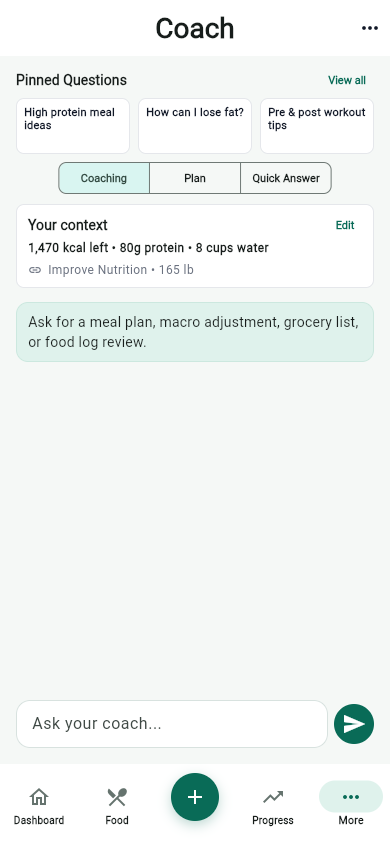
Can an AI nutrition coach guide you to the right app screen without changing your data? Yes, if navigation and data-changing actions are treated as different capabilities. In MyFitLife, Coach Milo can return a structured action suggestion, but the mobile app checks that suggestion before doing anything. An approved action can open Food, Progress, Pantry, Coach, Fasting, Hydration, Recipes, or Grocery. That navigation does not silently change a meal, water, fasting, goal, or account record.
The qualification matters. A Coach conversation still processes the question and the bounded context needed to answer it. Premium users can also have conversations and saved questions stored across sessions. The narrow promise is therefore about the action chip: changing the screen is not the same as changing the user’s nutrition or wellness records.
The MyFitLife answer
MyFitLife separates generated suggestions from deterministic app behavior. Coach Milo can propose as many as four structured actions with a response. When the user taps one, client code decides whether it is an approved navigation action. The specialized open_recipes action opens the fixed Recipes tab inside Pantry, and open_shopping_list opens the fixed Grocery tab. A generic screen action works only when its destination exactly matches one of six values: food, progress, pantry, coach, fasting, and hydration.
Anything outside that navigation contract does not become a silent write. A suggestion to log a meal, add water, start a fast, end a fast, search for food, or add a Grocery item remains a prompt handoff. The app places suggested text in the Coach composer and waits. The user can review it, edit it, send it, or ignore it. Actual record changes stay in the app’s normal user-controlled workflows.
Why safe navigation needs a trust boundary
A language model generates plausible output; it does not establish permission. NIST describes generative-AI confabulation as confidently presented but erroneous content and recommends defining human oversight, testing safeguards, and documenting the limits of system capabilities. In a health-related app, an invented destination or misunderstood instruction should not become authority to alter a person’s records.
OWASP calls the broader security problem excessive agency: an AI system has more functionality, permission, or autonomy than its job requires. Its recommended direction is to minimize available functions, avoid open-ended tools, use least privilege, and require human confirmation for higher-impact actions. MyFitLife applies that idea by giving navigation a small deterministic contract while withholding direct mutation authority from Coach action chips.
The G.U.I.D.E. framework for bounded AI actions
The architecture can be explained with five steps: Ground the response in bounded context; Use structured suggestions instead of treating prose as commands; Inspect every destination against a client allowlist; Direct the user to a screen or draft a prompt; and Execute data changes only through an explicit user-controlled product flow. The language model contributes the suggestion, but application code owns the consequence.
- Ground: send only relevant, capped context for the current request.
- Use: require a structured response with a limited number of action objects.
- Inspect: match navigation metadata against exact client-owned destinations.
- Direct: open an approved screen or turn the suggestion into editable text.
- Execute: keep food, water, fasting, Grocery, goal, and account changes behind normal user actions.
G — Ground the answer in bounded context
Useful guidance needs context, but more data is not automatically better. The MyFitLife mobile client can assemble a compact snapshot containing profile and goal information, today’s calories and macros, recent and saved meals, a few recipes, Grocery items, hydration, fasting state and recent fasting history, plus the actions and screens the client says it supports. Feature-specific limits reduce each collection before it leaves the device.
The backend applies another boundary. Accepted context fields are explicitly named, unknown top-level fields are ignored, nested lists and objects are capped, and long strings are truncated. Health activity receives an additional trust check: client-supplied Health context is removed, and a limited current-day activity summary is inserted by the backend only when an eligible Premium user separately enables Coach sharing. Calorie adjustment and Coach sharing remain different choices.
This does not mean the context is anonymous or inconsequential. Food, weight, fasting, goals, and coaching questions can be sensitive. The MyFitLife Privacy Statement explains the data categories, service providers, optional Health sharing, security controls, and deletion choices. Bounded context is a data-minimization technique, not a claim that no personal information is processed.
U — Use structured suggestions, not prose as commands
Coach Milo returns a written response plus structured fields for response mode, safety flags, and actions. The action list is limited to four items. Each usable action has a label, a type, an optional prompt, and optional metadata. The backend rejects unsupported action types and ignores malformed entries instead of treating arbitrary model text as an executable instruction.
Structure makes validation possible, but it is not permission by itself. The backend vocabulary includes navigation actions and mutation-shaped suggestions because both can be useful in a conversation. The important control comes next: the mobile dispatcher recognizes only the navigation subset as directly executable. A model-generated action object is a proposal until deterministic client code accepts it.
I — Inspect every destination on the device
The app uses two fixed navigation actions and one exact destination map. The open-recipes action always opens the Recipes tab inside Pantry. The open-shopping-list action always opens the Grocery tab inside Pantry. The generic open-screen action accepts only food, progress, pantry, coach, fasting, or hydration. It cannot supply an arbitrary route, URL, Settings destination, account page, or external website.
- Missing or non-text screen metadata is rejected.
- Uppercase, leading spaces, trailing spaces, tabs, and line breaks do not become valid destinations.
- Similar-looking values such as recipes, shopping_list, or settings are not silently corrected.
- An unknown destination is rejected and falls back to the non-navigation prompt path.
This is deliberately stricter than asking the model whether its own output looks reasonable. The destination list belongs to the shipped client, can be covered by deterministic tests, and cannot expand merely because generated text invents a new value. Clicking an accepted chip changes the selected page or Pantry tab; it does not call a domain mutation endpoint.
D — Direct the user or draft the next prompt
When an action is not approved for direct navigation, MyFitLife preserves usefulness without granting more authority. The app takes the action’s prompt, or its visible label when no prompt is supplied, places that text in the Coach composer, and moves keyboard focus there. It does not automatically send the message. The user sees the proposed next step before deciding whether it deserves another AI request.
That behavior applies to mutation-shaped suggestions such as adding water, logging a meal, starting or ending a fast, adding a Grocery item, or searching for food. It also protects against malformed action metadata that reaches the client. If no usable prompt or label remains, the chip produces no follow-up. Unsupported action types can be removed by backend validation before they reach the phone at all.
E — Execute writes through explicit app workflows
A prompt can explain what to do next, but it cannot make a meal appear in today’s log. A navigation chip can open Fasting, but it cannot start or stop a session. Opening Hydration cannot add ounces. Opening Grocery cannot add, delete, check, or recategorize an item. The Coach navigator does not silently write, log, add, or change those records. The changes still require the user to operate the relevant screen and invoke the app control designed for that task.
This separates low-impact assistance from higher-impact authority. Navigation is reversible: the user can move back to another screen. A stored record can affect totals, history, plans, and later coaching context. Keeping those writes behind explicit controls makes the source of the change understandable and prevents a plausible but incorrect model response from becoming a hidden data mutation.
Does opening a screen change anything?
It changes transient interface state: the app displays another destination. It does not change the underlying nutrition, hydration, fasting, goal, Grocery, profile, subscription, or account record. That distinction is why the most accurate wording is “navigation without a domain-data mutation,” not the broader and misleading claim that nothing changes anywhere.
What happens to the Coach conversation?
Sending a question is separate from tapping a navigation chip. The authenticated backend processes the message, enforces rate and AI-usage limits, assembles allowed context, and returns the response. Operational metadata such as quota state, request timing, errors, and security events may be retained as described in the privacy policy. Google Vertex AI and Gemini process Coach prompts and context for the requested feature.
Premium exchanges can be stored in the account’s Coach chat collection, and normalized questions can be saved in a separate question library with an ask count, response mode, pin state, and short answer preview. Free replies are returned without saved server history, although the current app session can still show the exchange. Clearing chat and deleting a saved question are separate user actions; clearing one does not silently delete the other.
Why human control still matters in a wellness app
WHO guidance for AI in health emphasizes human autonomy, safety, transparency, accountability, and rigorous evaluation. The agency also warns that language-model responses can sound authoritative while being wrong. An action chip can make advice feel more concrete, so the boundary between “show me where to go” and “change my record for me” should be visible in both the interface and the implementation.
MyFitLife also applies nutrition and fasting safety rules before and after model generation. Specified unsafe weight-loss, self-harm, dry-fasting, pregnancy, diabetes or medication, extreme-fasting, and alarming-symptom requests can be intercepted with a refusal or professional-care redirect. Specified unsafe model-output patterns are checked again. These are safeguards, not a guarantee that every AI answer is complete or correct.
Is Coach Milo medical advice?
No. MyFitLife is a general-wellness, food-logging, planning, hydration, fasting, supplement-label, progress, and AI-assisted coaching tool. It does not diagnose, treat, cure, prevent, or monitor a disease and should not replace a physician, registered dietitian, or other qualified professional. AI responses may be incomplete, outdated, or inaccurate, and urgent health decisions should never depend on an app action chip.
A technical walk-through
- The user asks Coach Milo a nutrition or wellness question.
- The client builds a capped context snapshot from supported MyFitLife features.
- The authenticated backend applies request validation, rate limits, quota checks, and context caps.
- Coach Milo returns structured text, a response mode, safety flags, and up to four action suggestions.
- Backend schema validation removes unsupported or malformed action types.
- The user taps an action chip; nothing is dispatched merely because the model generated it.
- The client opens a fixed or allowlisted destination only when the action matches the navigation contract.
- Every other usable suggestion becomes editable composer text and waits for the user to send it.
- Any eventual record change occurs through a separate, explicit MyFitLife workflow.
This is a practical form of bounded agency: fail closed for data-changing behavior while preserving a useful suggestion as text. Coach Milo can help the user find the next screen, but the application—not generated prose—decides what that screen is allowed to do.
Sources and further reading
- Artificial Intelligence Risk Management Framework (AI RMF 1.0) National Institute of Standards and Technology
- Artificial Intelligence Risk Management Framework: Generative Artificial Intelligence Profile National Institute of Standards and Technology
- LLM06:2025 Excessive Agency OWASP GenAI Security Project
- WHO Calls for Safe and Ethical AI for Health World Health Organization
- General Wellness: Policy for Low Risk Devices U.S. Food and Drug Administration
- Mobile Health App Interactive Tool Federal Trade Commission
- Complying with the FTC Health Breach Notification Rule Federal Trade Commission
- Health Products Compliance Guidance Federal Trade Commission
- Resources for Mobile Health Apps Developers U.S. Department of Health and Human Services
- Privacy Framework National Institute of Standards and Technology
- MyFitLife Privacy Statement MyFitLife
- MyFitLife Health Disclaimer MyFitLife
Related articles
- Can AI Personalize Nutrition Without Overpromising?
- AI Nutrition Coach Questions That Lead to Better Answers
- How to Get Better Answers From Coach Milo
Install free. Keep the core tracker free.
Log food, scan barcodes, track macros, and review progress without starting a subscription.