Can You Plan Weekly Meals Before Logging Them?
Learn how to plan a full week of meals, compare projected macros, prepare groceries, and keep planned food separate from what you actually log.
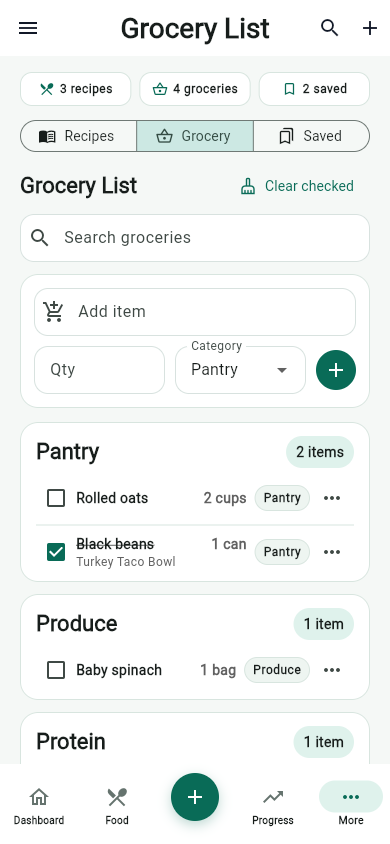
Can you plan weekly meals before logging them? Yes. MyFitLife lets you build a seven-day meal plan, review projected calories and macros, adjust servings, and prepare a grocery export without adding those foods to your consumed nutrition. Planning and eating are deliberately separate states. Nothing changes today’s logged totals until you choose Log for an eligible meal slot. That makes the planner useful for answering “What could this week look like?” without turning intention into a false record of what happened.
The distinction sounds simple, but many food-tracking workflows blur it. A copied meal, saved recipe, or future entry can appear in daily totals even though it is still only an idea. MyFitLife treats a plan as an editable forecast and the nutrition log as a record of user-confirmed consumption. The mobile interface makes that difference visible, while the backend keeps it structural: planned meals and consumed nutrition live in separate records and move together only through an explicit, protected logging action.
Why plan meals before recording them?
Weekly meal planning moves several food decisions into one review before time, energy, or ingredients become limited. It can help a household decide which dinners need groceries, whether breakfasts are realistic, and where a protein, fiber, or hydration goal may be difficult to meet. A large cross-sectional study of French adults found associations between meal planning, food variety, and diet quality, but its authors explicitly said the study could not establish causality. The Dietary Guidelines for Americans and CDC resources provide pattern-level guidance; a planning tool turns that guidance into candidates for specific days.
A plan is still not a prediction or prescription. Travel, appetite, training, schedules, food access, medical needs, and preferences can change. That is why planning should remain reversible. Use projected values to compare options, not to claim future accuracy. If Tuesday’s dinner changes, edit the plan. If you eat what was planned, log it. If you eat something else, record what you actually consumed. The goal is a more useful decision process, not perfect compliance with a calendar.
How MyFitLife separates planned food from consumed food
MyFitLife stores each Sunday-based week as its own meal-plan record, with dated slots for Breakfast, Lunch, Dinner, Snack, and Drinks. Adding, moving, copying, or removing a planned item updates that plan only. The consumed nutrition record remains unchanged. This means a Wednesday dinner can contribute to projected macros in the planner without appearing in Wednesday’s calorie history before the meal occurs.
- Planned means the item is available in a dated meal slot and can still be changed.
- Logged means the user explicitly confirmed the eligible slot as consumed; its items are then read-only in the planner.
- Skipped means the slot is not being treated as consumed.
- Projected macros describe the current plan. Logged totals describe the foods actually recorded.
This model prevents a common analytical error: comparing nutrition or weight trends with foods that were scheduled but never eaten. Differences between planned and logged meals can suggest where preparation, portions, availability, or timing deserve review, but they cannot explain why by themselves. Treat the gap as a prompt, not a judgment.
Build one meal from five familiar sources
Open Meal Planner from the Dashboard, the Food page, or More. Choose a date and meal slot, then add foods through Search, Recent, Saved, Recipes, or Manual. Those sources are ordered to support both discovery and reuse. Search helps locate an entry, Recent and Saved shorten repeated logging, Recipes preserve multi-ingredient meals, and Manual handles a known item that is not available elsewhere.
Selections first enter a local draft. You can mix sources in one meal, change servings, remove an item, and inspect the projected calories, protein, carbohydrate, and fat before confirming Build this meal. That draft is not written item by item while you experiment. One confirmation sends the intended set together, which is important when a meal contains several components that should either all appear or none appear.
The planner itself is available without Premium and introduces no new AI model call or AI quota. Building from Recent, Saved, Recipes, or Manual does not require an AI request. Search uses MyFitLife’s existing food-search capability, while generated or imported recipe drafts must first be saved as canonical recipes before they can be placed. Meal planning should not be confused with asking an AI system to invent a menu.
Projected nutrition is a comparison tool, not a consumed total
Projected macros are most useful when comparing complete meal candidates on the same basis. Check the serving attached to each item, especially when a food database reports per 100 grams but a package label reports per serving. FDA serving-size guidance explains that labeled serving size is a standardized reference, not necessarily the amount an individual should eat. FoodData Central can provide useful reference and branded-food information, but the current package label remains important for a specific packaged product.
- Start with meals you are likely to repeat, because accurate saved foods and recipes reduce re-entry.
- Check the food identity, serving basis, and quantity before treating a macro projection as comparable.
- Review the whole day rather than optimizing one number in isolation; calories, protein, carbohydrates, fats, variety, and practical feasibility all matter.
- Leave room for uncertainty. Restaurant portions, homemade recipes, substitutions, and cooking changes can make actual intake differ from the plan.
- Log the meal only after consumption, then correct the consumed record if the amount or item was different.
If meal timing or nutrient targets are part of clinical care, follow the individualized method set by your clinician or registered dietitian. CDC and American Diabetes Association meal-planning materials can support informed questions for people managing diabetes, but the app does not know every medication, lab result, diagnosis, or treatment target. A general-wellness projection should not override a medical nutrition plan.
What atomic meal building protects
A multi-item meal creates a reliability problem if each item is saved independently. A connection could fail after the first two items, leaving half a dinner in the plan. A retry could then add duplicates. MyFitLife addresses this with one receipt-backed batch request for the confirmed slot. The backend validates the week, date, meal type, sources, servings, ownership, and final capacity, then writes every accepted item in one transaction or writes none.
The same user intent also carries an idempotency key. If the device loses the response after the transaction succeeds, repeating the same request returns the authoritative plan instead of building the meal twice. Reusing that key with changed content is rejected rather than silently treating a different meal as the original request. This combination gives the interface a practical “confirm once” behavior even when networks and clients retry.
The batch is bounded to 1–20 items in one date and meal slot, with additional finite slot, week, ingredient, and document-size limits. For ordinary use, the result is simple: a meal should not be partially created because the connection failed.
Logging is another atomic, idempotent step
When you choose Log on a nonfuture slot, MyFitLife does more than copy a display card. One backend transaction reads the plan and the consumed day, merges the slot’s item snapshots, recalculates the day once, updates recent foods, marks the slot logged, and records a small idempotency receipt. If the same logging intent is replayed, the consumed nutrition is not added twice. Once logged, the slot and its planned items become immutable so the plan cannot quietly diverge from the record created from it.
An active fast adds an explicit decision. The app can ask whether to end the fast or, where permitted, keep it active. That choice is validated against the current fasting session and committed with the meal log, so the meal cannot succeed while its required fasting decision fails independently. A strict weekly fast must end before food is logged. Invalid or stale state aborts the combined action rather than creating an ambiguous partial result.
Copy the previous week without overwriting this one
Repeating a useful structure can be faster than rebuilding it. Copy Previous shifts the prior plan forward seven days and resets copied slots to planned status. It only writes into an empty target week. If the target already contains items, the backend rejects the copy instead of merging two weeks or overwriting current choices. The copy action also has its own idempotency key, so retrying after a lost response returns the already-copied plan rather than duplicating it.
After copying, inspect every day. Last week’s portions, schedule, pantry, or fasting plan may not apply. Reuse is a starting point, not proof that the new week has been reviewed.
How grocery preview avoids silent substitutions
Grocery export begins with a read-only preview. MyFitLife gathers ingredient strings from the selected planned slots, trims and normalizes whitespace, compares them without regard to letter case, and removes only exact normalized duplicates. “1 cup spinach” and “1 CUP spinach” can collapse to one entry. “1 cup spinach” and “200 grams spinach” remain different because the system performs no unit conversion, quantity addition, package sizing, or ingredient inference.
That conservative rule avoids pretending that text alone proves two quantities are equivalent. It also means the grocery list may need human cleanup. Two recipes might describe the same ingredient in incompatible units, or the same phrase may refer to quantities that should be combined. Review the preview against the recipes and pantry before shopping; do not interpret deduplication as nutritional or culinary calculation.
The preview includes a token bound to the selected week, slot IDs, normalized display names, and the contributing slots for each ingredient. During export, the backend recomputes that token inside the transaction. If an edit changes the selected slots, normalized ingredient entries, or which selected slots contribute an ingredient after preview, export returns a stale-preview conflict before writing shopping-list items. Refreshing the preview makes the proposed mutation visible again.
A practical weekly workflow
- Open the next Sunday-based week and place the most constrained meals first, such as work lunches, training-day dinners, or family meals.
- Build each slot from Search, Recent, Saved, Recipes, and Manual, checking servings and projected macros before one confirmation.
- Scan the full week for repetition, missing ingredients, unrealistic preparation demands, and days that depend on uncertain plans.
- Copy a previous week only when the target is empty, then review every copied slot as a new decision.
- Generate the grocery preview, resolve obvious duplicate-unit or pantry questions yourself, and export only the version you reviewed.
- After eating, explicitly log the eligible slot. If the foods or portions changed, record the consumed reality rather than preserving the forecast.
Privacy, accuracy, and health boundaries
A meal plan can reveal routines, preferences, and health-related goals. MyFitLife limits planner records to the authenticated owner, routes writes through the backend, and includes meal plans in account deletion. Review the Privacy Statement, protect account access, and avoid unnecessary medical details in free-text food names or ingredient notes.
MyFitLife is a general-wellness app, not a medical device, food-safety system, allergy verifier, or substitute for professional care. It cannot confirm that a plan was eaten, determine whether a food is safe for an allergy, diagnose a nutrient deficiency, or prescribe a calorie target. Planned and logged values remain estimates shaped by source data and entered portions. The Health Disclaimer explains these boundaries and when professional guidance should take priority.
The MyFitLife answer
Yes—you can plan weekly meals before logging them, and MyFitLife is designed to preserve the difference. Build meals from familiar sources, adjust servings, compare projected macros, copy a reviewed structure, and preview groceries while consumed nutrition stays untouched. Planning is free and does not introduce an AI generation request or quota. Only an explicit Log action moves an eligible meal into the consumed record.
The deeper answer is dependable state management. Atomic batch creation prevents partial meals. Idempotent retries prevent duplicates. Logged-slot immutability preserves what was confirmed. Exact-only grocery normalization avoids invented unit math, and stale-preview rejection stops an unseen plan change from producing a different shopping list. Together, those safeguards let the weekly plan remain what it should be: an editable forecast that helps you prepare, followed by a separate record of what you actually ate.
Sources and further reading
- Dietary Guidelines for Americans, 2025-2030 U.S. Department of Health and Human Services and USDA
- Tips for Healthy Eating for a Healthy Weight Centers for Disease Control and Prevention
- How to Have Healthier Meals and Snacks Centers for Disease Control and Prevention
- Diabetes Meal Planning Centers for Disease Control and Prevention
- Meal Planning American Diabetes Association
- How to Understand and Use the Nutrition Facts Label U.S. Food and Drug Administration
- Serving Size on the Nutrition Facts Label U.S. Food and Drug Administration
- FoodData Central U.S. Department of Agriculture
- Meal planning is associated with food variety, diet quality and body weight status in a large sample of French adults International Journal of Behavioral Nutrition and Physical Activity via PubMed Central
- MyFitLife Privacy Statement MyFitLife
- MyFitLife Health Disclaimer MyFitLife
Related articles
- How to Use the MyFitLife Meal Planner: Build, Shop, and Log Your Week
- High-Protein Meal Prep Ideas for Weight Loss
- Can a Grocery List Automatically Sort Recipe Ingredients by Store Aisle?
Install free. Keep the core tracker free.
Log food, scan barcodes, track macros, and review progress without starting a subscription.