How Does a Calorie Tracker Avoid Double-Counting Exercise Calories?
See how MyFitLife separates steps, daily active energy, and workout calories so optional activity credit is applied once, not counted twice.
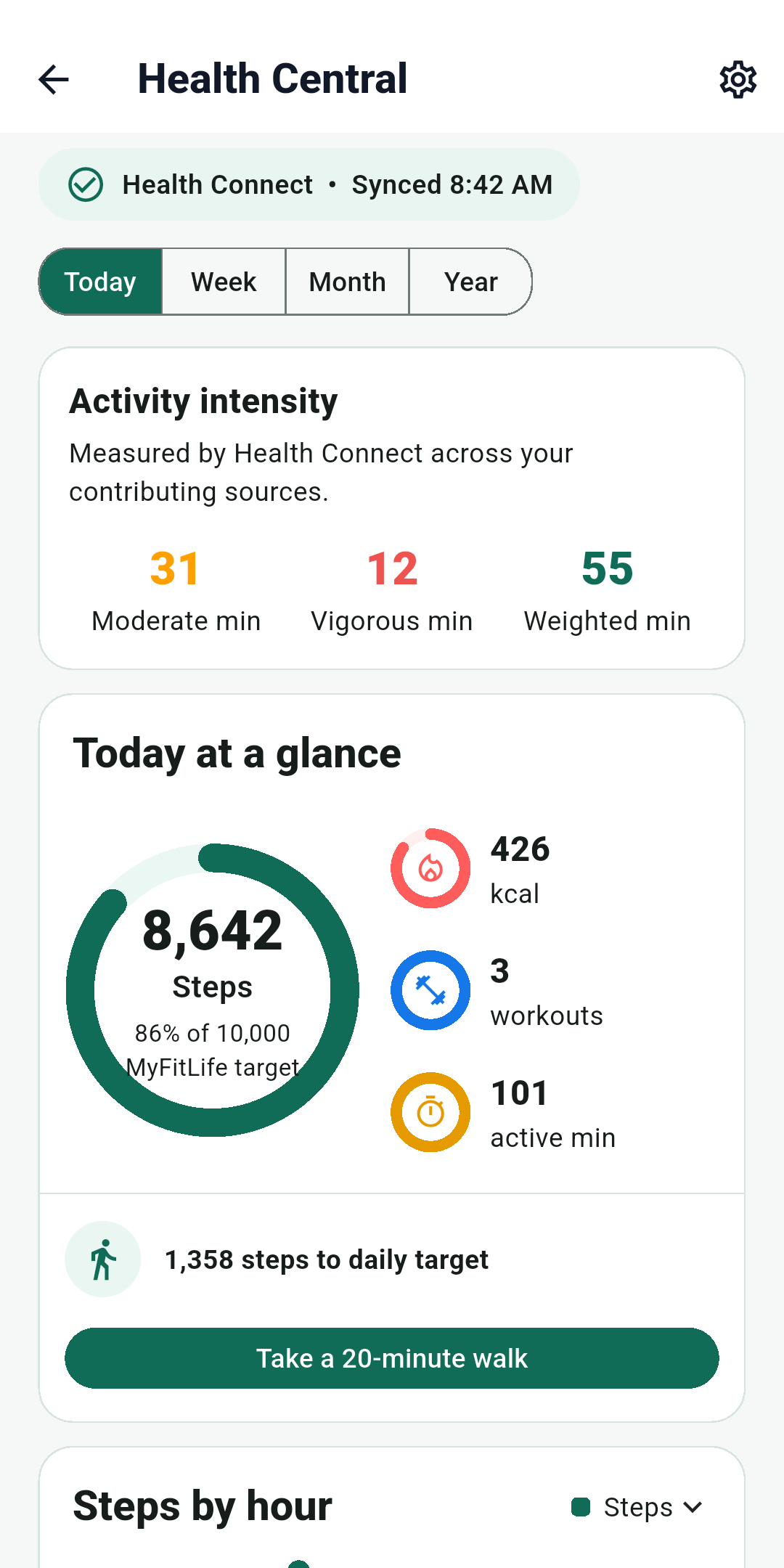
How does a calorie tracker avoid double-counting exercise calories? It chooses one calorie-bearing activity signal for the day and refuses to add overlapping signals on top of it. MyFitLife uses the daily Active Calories value supplied by the connected Apple Health or Health Connect source. Steps remain progress-only, workout-window calories remain display-only, and basal or total energy is not added. If the optional calorie adjustment is off—as it is by default—the nutrition target does not change. If a user explicitly enables it, MyFitLife adds 100% of that one daily active-calorie aggregate to the user’s static target once.
That rule matters because the same walk can appear in several forms. A phone may record 4,000 steps, a watch may estimate active energy throughout the walk, and a workout session may describe the same 35-minute interval. Adding a calorie estimate derived from the steps, the provider’s daily active energy, and the workout’s calories would describe one event three times. MyFitLife keeps the signals useful without pretending they are independent sources of energy expenditure.
Health Central is available in the current public MyFitLife listings on iOS and Android as of September 11, 2026. The App Store lists version 1.3.7, and Google Play describes Build 31 with Premium Health Connect features. Availability still depends on platform, a compatible device, granted permissions, and Premium access. Check More > Health Central in the installed app; these accounting safeguards do not promise that every provider record or optional platform insight is available to every account.
Start by separating four activity measurements
Steps, active calories, total calories, and workout calories answer different questions. Apple defines step count as a cumulative count of steps. Health Connect similarly stores step records as counts over time. A step count does not itself encode the body mass, pace, grade, load, movement efficiency, device placement, and other inputs needed to individualize an energy estimate. MyFitLife can therefore show steps toward an activity target without converting a step into a fixed calorie value.
- Steps are a movement count. In MyFitLife they support activity progress and are never multiplied by a calories-per-step formula.
- Active calories are the connected provider’s estimate of energy associated with physical activity and exercise. Apple says active energy excludes resting energy; Health Connect defines active calories as excluding basal metabolic rate.
- Basal or resting energy represents energy used at rest. MyFitLife does not request that stream for calorie credit.
- Total calories generally combine active and basal energy. MyFitLife does not add total calories because doing so would mix the activity increment with energy already represented in a daily nutrition target.
- Workout-window calories come from the same provider active-energy stream used for daily aggregates and may overlap one or more daily totals. MyFitLife treats the window value as display-only and never as a second credit.
Health Connect defines ActiveCaloriesBurnedRecord as excluding basal metabolic rate and TotalCaloriesBurnedRecord as including active and basal energy. Apple likewise separates active from resting energy. Adding total energy to a target already based on a static daily budget can therefore create structural duplication before a workout is considered.
Where exercise calories are commonly counted twice
The obvious error is adding a workout calorie number to a daily active-calorie number that already contains the workout interval. A less obvious error is converting steps into calories and then adding them to the same daily active total. Another is combining active-calorie totals from Apple Health and Health Connect after a person changes phones or has overlapping source records. Each mistake treats correlated views of activity as separate energy events.
- A connected provider reports 430 daily active calories, including a recorded run.
- The run detail reports 260 active calories during its time window.
- The same day contains 9,200 steps, some of which occurred during the run.
- The defensible MyFitLife calorie-bearing value is still the provider’s 430-calorie daily active aggregate—not 430 plus 260 plus a step conversion.
This example explains accounting, not the physiological accuracy of 430. A 2020 systematic review covering studies through May 2019 found substantial variation in wearable energy-expenditure validity; it does not validate current 2026 devices. The CDC also notes that calories used vary by person. MyFitLife prevents arithmetic duplication but cannot turn a provider estimate into a laboratory measurement.
MyFitLife uses one provider aggregate for daily credit
Health Central requests read-only access to steps, active energy, and workouts. For each local day, the mobile app reads the connected provider’s active-energy samples and produces one daily active-calorie aggregate. It sends that daily value to the MyFitLife backend alongside the step count and workout metadata. It does not request basal energy or total calories for this calculation.
The supported Health Central experience presents one active provider and requires disconnect-and-delete before a provider switch. A daily document can retain source-isolated summaries for defensive reconciliation and legacy handling, but the backend projects one canonical daily source rather than summing providers. The most recently synchronized valid source becomes the day’s displayed and credit-bearing summary. This prevents separate provider values from being added together merely because the storage model can recognize both source types.
“One provider aggregate” is an accounting boundary, not a claim that the provider saw every activity. Permissions, an unworn device, delayed synchronization, source priority, or a provider correction can change the value MyFitLife receives. Source and last-sync context help identify it as connected data, not observed truth.
Steps remain useful without becoming calories
A step goal can help a person review movement consistency even though step count is not used for calorie credit. MyFitLife shows steps, current-day hourly step patterns when available in the page session, and progress toward its activity target. It never estimates calories from step count, and hourly values are not retained as history. Walking energy can still be represented because a connected provider may include its estimated energy in the daily Active Calories stream.
Two people can take the same number of steps at different speeds, grades, stride lengths, body sizes, or loads. A universal calories-per-step multiplier would add an app-created estimate on top of a provider estimate that may already reflect some of those conditions.
Workout-window calories explain a session but do not change the target
A workout record is still valuable. MyFitLife stores a provider-backed session identity, type, start and end time, duration, and available source or device label. On the device connected to the account’s active provider, opening workout details can read active energy for that exact time window. A device on another platform cannot query the remote health store for that value. The result answers a narrow question: how much active energy did the provider associate with this interval?
The workout-window value is display-only. It may overlap the provider’s daily Active Calories aggregate, including across a local-day boundary, so MyFitLife never treats it as an additional credit. If the provider has no readable value for the interval, MyFitLife shows it as unavailable rather than estimating from workout type or duration. A workout-only day with no daily active-energy aggregate receives zero activity credit even when the session itself appears in history.
Calorie adjustment is explicit, optional, and off by default
Health Central connection, synchronization, workout detail, and historical Health views require Premium. Connecting does not silently raise the food budget or share activity with Coach Milo: calorie adjustment and Coach sharing are separate controls, both off by default. With adjustment disabled, credit is zero and the static target remains. Historical Health presentation may pause without Premium, but disconnect and deletion remain available.
Enabling the setting requires a confirmation that explains the rule: keep the current static target and add 100% of synced daily active calories. The backend rounds the one daily aggregate to a whole-calorie credit and adds it once. Disabling the setting returns credit to zero. This is transparent budget arithmetic, not an instruction to consume a specific amount and not a guarantee that eating the adjusted target will create, preserve, or eliminate a calorie deficit.
The 100% option is a product policy, not a physiological correction factor. MyFitLife does not claim that the device estimate equals net energy expenditure, that every active calorie should be replaced with food, or that a higher displayed target is appropriate for every person. People using clinician-set nutrition targets, managing pregnancy, an eating disorder, diabetes, medications, or another medical condition should follow individualized professional guidance instead of changing intake from a wearable number.
Replay-safe synchronization prevents accumulation
Double counting can also happen during network retries if a server treats every sync as a new increment. MyFitLife synchronizes a bounded date window as authoritative state. Each daily document is keyed by local date, with source-isolated summaries retained inside that document and one canonical source projected at the top level instead of summing providers. Workouts use deterministic identities derived from the provider platform and external workout identifier. Replaying the same payload updates the same records instead of appending another copy or adding calories to the previous value.
The mobile reader also de-duplicates workout sessions with the same provider identifier or the same type-and-time fingerprint before upload. During full-window replacement, sessions absent from the refreshed provider window can be removed for that source rather than accumulated as stale copies. This produces an idempotent outcome: the same provider state converges on the same MyFitLife state even if the client retries after a lost response.
Idempotency protects storage arithmetic; it does not validate the sensor estimate. If a provider later revises a daily active total, the next synchronization can replace the stored aggregate and recalculate the day’s activity credit. That correction is preferable to preserving a stale value, but it also means recent numbers can change as source data settles.
Historical targets keep the policy that applied on that date
A current profile edit should not rewrite what an older calorie target meant. For past days, MyFitLife preserves the stored static target, whether calorie adjustment was enabled, and the target-policy version that applied on that date. If a provider refresh changes the past day’s active aggregate, the app can recalculate the activity credit against that historical basis instead of substituting today’s static target or current preference.
Daily aggregates can remain for up to 400 local dates, detailed workout rows for 30 dates, and current-day hourly arrays are transient. Only after a daily aggregate ages out can MyFitLife keep an allowlisted target-only archive with the date, policy version, historical targets, adjustment status, active-calorie credit, and effective target. That archive preserves calorie-history meaning without activity detail; it proves neither intake, provider accuracy, nor an outcome.
A practical double-counting audit
- Confirm which provider supplies the day’s Active Calories value and when it last synchronized.
- Check that the app is using active energy, not total energy that includes basal or resting expenditure.
- Keep steps as a separate count; do not add a second calorie estimate derived from them.
- Treat workout-window calories as an explanation of part of the day, not an additional credit.
- Verify whether activity credit is enabled. Off should mean zero change to the static target.
- When enabled, confirm that one daily aggregate is added once and that a repeated sync does not increase it again.
- For historical comparisons, read the target and preference that applied on that date instead of retroactively applying today’s settings.
Accuracy, privacy, and health boundaries
Activity data can reveal routines, workout times, device sources, and health-related goals. MyFitLife requests read-only access to the limited activity types used by Health Central, sends synchronized summaries through authenticated backend workflows, and provides controls to disconnect or delete MyFitLife’s stored Health data without deleting the source data from Apple Health or Health Connect. Review the Privacy Statement and the permissions shown by the operating system before connecting.
MyFitLife is a general-wellness iOS and Android app, not a medical device, metabolic measurement system, or treatment program. Active calories, steps, workout duration, and calorie targets can support personal review, but they cannot diagnose a condition, measure an individual’s true energy expenditure, establish a guaranteed deficit, or prescribe how much to eat. The FDA’s general-wellness guidance and MyFitLife Health Disclaimer describe the boundary between healthy-lifestyle support and medical claims.
The MyFitLife answer
MyFitLife avoids double-counting exercise calories by giving only one signal permission to change the daily nutrition target: the canonical connected provider’s daily Active Calories aggregate. Steps are progress-only and are never converted into calories. Basal and total energy are not added. Workout-window active calories are shown only as a breakdown and are never stacked on the daily total. The optional 100% credit is off by default and changes the target only after the user explicitly enables it.
The deeper answer is controlled state, not a promise of perfect measurement. Date-keyed summaries, deterministic workout identities, source-isolated replacement, and replay-safe synchronization prevent retries and overlapping source records from accumulating calories. Historical target snapshots preserve the policy that actually applied to each date. Together, those safeguards answer the accounting question honestly: MyFitLife can prevent the same provider-reported activity from being added twice, while leaving the physiological estimate and any decision about food intake within their proper limits.
Sources and further reading
- activeEnergyBurned Apple Developer Documentation
- stepCount Apple Developer Documentation
- ActiveCaloriesBurnedRecord Android Developers
- TotalCaloriesBurnedRecord Android Developers
- Read aggregated data in Health Connect Android Developers
- StepsRecord Android Developers
- Physical Activity and Your Weight and Health Centers for Disease Control and Prevention
- Reliability and Validity of Commercially Available Wearable Devices for Measuring Steps, Energy Expenditure, and Heart Rate: Systematic Review JMIR mHealth and uHealth via PubMed
- General Wellness: Policy for Low Risk Devices U.S. Food and Drug Administration
- MyFitLife Privacy Statement MyFitLife
- MyFitLife Health Disclaimer MyFitLife
- MyFitLife: Food Logger on the App Store Apple App Store
- MyFitLife: Food Logger on Google Play Google Play
Related articles
- How to Connect MyFitLife to Apple Health or Health Connect
- Can a Nutrition App Sync Apple Health and Health Connect Activity?
- Can You Delete Synced Health Data Without Deleting Apple Health or Health Connect?
Install free. Keep the core tracker free.
Log food, scan barcodes, track macros, and review progress without starting a subscription.