Can a Nutrition App Sync Apple Health and Health Connect Activity?
See how MyFitLife connects read-only Apple Health or Health Connect activity while preserving permissions, source boundaries, and useful trends.
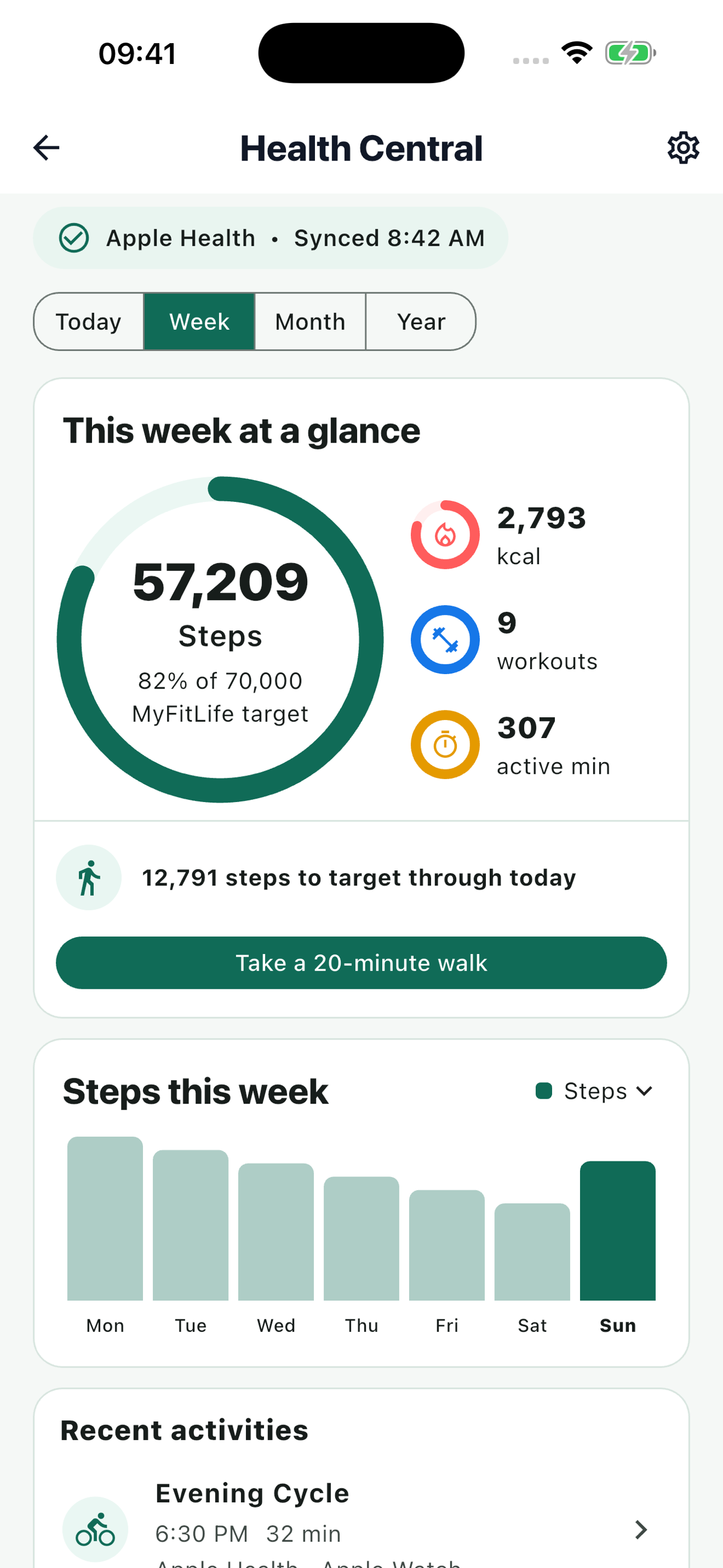
Can a nutrition app sync Apple Health and Health Connect activity? Yes, if it treats the phone health platform as a permission-controlled source instead of a universal cloud account. MyFitLife Health Central is designed to connect one active provider per MyFitLife account: Apple Health on an Apple device or Health Connect on Android. It can bring approved activity context beside nutrition without importing meals from the health platform, writing activity back to it, or pretending that Apple and Android expose identical data.
Health Central is available in the current public MyFitLife listings on iOS and Android as of September 11, 2026. The App Store lists version 1.3.7, and Google Play describes Build 31 with Premium Health Connect features. Availability still depends on platform, a compatible device, granted permissions, and Premium access. Check More > Health Central in the installed app and review the permission sheet shown on that device; a store listing does not guarantee that every provider record or optional platform insight is available to every account.
Why nutrition and activity belong together—but should not become one number
Nutrition and activity answer related but different questions. A food log estimates what a person recorded as consumed. A health platform aggregates observations reported by phones, watches, apps, and exercise equipment. Showing both can reduce app switching and provide context for a daily plan, but combining them carelessly creates false precision. Missing watch wear, delayed source updates, incomplete permissions, duplicate workouts, time-zone boundaries, and provider-specific aggregation can all change what appears in an activity total.
MyFitLife therefore keeps the nutrition record and connected activity record distinct. Steps are progress context, not a calorie formula. Daily Active Calories may optionally affect the MyFitLife calorie target only after the user enables that choice. Workout-window calories can explain an individual activity when available, but they are display-only and are never added on top of the provider’s daily Active Calories total. That non-additive rule avoids counting the same movement once in a daily aggregate and again in a workout row.
One MyFitLife account uses one active health provider
Apple Health and Health Connect are device-platform stores, not two interchangeable login methods for one upstream dataset. MyFitLife records one connected source for the account. It does not silently connect Apple Health and Health Connect at the same time, merge their daily totals, or guess whether two workouts represent the same event across providers. That choice makes ownership and deletion understandable and reduces the risk of duplicated steps, calories, or exercise sessions.
- Connect Apple Health from a supported Apple device or Health Connect from a supported Android device.
- Sync occurs only on a device whose local platform matches the provider connected to the MyFitLife account.
- To switch providers, disconnect and delete the existing MyFitLife Health connection, then connect the provider available on the new device.
- MyFitLife does not revoke or configure the unrelated local provider when the account is opened on a different platform.
What read-only activity access includes
The shared connection is intentionally narrow. On Apple devices, it can request read access to steps, active energy, and workouts. On Android, the comparable core is steps, active calories burned, and exercise sessions. Permission remains controlled by the operating system and the person using the device. Apple explains that HealthKit authorization is fine-grained by data type and deliberately prevents an app from reliably distinguishing denied read access from an empty result. Android likewise requires declared data-type permissions and gives users controls to remove access.
A provider may also supply bounded, user-facing source app or device labels for an individual workout. Those labels help explain whether an activity came from a watch, phone, or another recording app, but they are attribution rather than proof of accuracy. Only bounded display labels enter the synchronized workout record; technical package, bundle, and local device identifiers are not presented as product-facing attribution. If multiple records within the one connected provider resolve into one de-duplicated activity and their labels differ, the interface can use a neutral multiple-sources or multiple-devices description instead of exposing technical identifiers.
What the connection deliberately excludes
A narrow permission request is easier to explain and audit than an open-ended health import. MyFitLife’s activity connection does not request permission to read meals, dietary intake, nutrition records, heart data, location, workout routes, total calories, basal calories, distance, floors climbed, sleep, or clinical records for this workflow. It also does not request write access to place MyFitLife nutrition or activity records into Apple Health or Health Connect.
Exclusion is a product boundary, not a claim that the platforms lack those data types. Health Connect and HealthKit support far broader health and fitness models. Apple’s design guidance says apps should request health information only when it is needed and clearly explain the benefit. Google’s publishing guidance similarly requires a user-facing justification for each Health Connect data type and a new declaration when an app adds one. A nutrition app earns trust by requesting the minimum useful scope, not by collecting everything a platform could expose.
How the sync window works
When a connection is established, MyFitLife’s initial reconciliation reads up to the latest 30 local days of approved activity. The explicit Sync now action also requests a full 30-day reconciliation. Automatic app-open or resume reconciliation covers two days and is debounced for 15 minutes. This bounded overlap helps repair late provider updates without rereading an entire history on every foreground event. The app does not require background Health access for this workflow, so a device that never opens MyFitLife cannot be assumed to keep the server record continuously current.
- The user opens Health Central and chooses Connect on the device that owns the intended provider.
- The operating system presents its permission controls for the requested read types.
- The mobile client reads bounded daily activity and workout windows from the local provider.
- An authenticated request sends the approved, normalized snapshot to the MyFitLife backend.
- The backend validates source, dates, sizes, numeric bounds, and ownership before updating the account read model.
- Later foreground reconciliation repairs recent changes; an explicit Sync action can request a current refresh on the matching device.
Today, Week, Month, and Year answer different questions
Health Central uses Today, Week, Month, and Year periods for steps, active calories, workouts, and active time. Today can show a current-day pattern when hourly values are available in the page session. Longer periods summarize daily records so a user can compare recent consistency without presenting an Apple Activity ring or Android-specific insight as though it were a universal multi-day measure. Apple Activity summaries are daily objects; Health Connect aggregates have their own supported record and duration semantics.
Detailed activity history can group records by day for Today and Week, by calendar week with day details for Month, and by month with weekly summaries for Year. Where workout types are available, filters such as Walking, Running, Cycling, and Strength narrow the visible activities. A filter depends on the type supplied by the provider; it cannot recover details that were never recorded or authorized. “No data,” a measured zero, an unavailable permission, and a stale sync are meaningfully different states and should not be rendered as the same conclusion.
Retention is not the same as import depth
MyFitLife can retain bounded daily aggregate activity for up to 400 local dates as the account continues to sync. That does not mean the first connection imports 400 days: initial reconciliation remains limited to 30 days. Detailed workout rows are retained for the current 30 local dates, while older daily trends can continue through aggregate steps, active calories, workout counts, and workout minutes. Current-day hourly chart arrays are transient and are not stored as long-term hourly history.
The distinction limits unnecessary detail while preserving useful trend continuity. A daily aggregate can answer “How did this month compare with last month?” without keeping every interval sample indefinitely. A workout row can support recent attribution and detail without becoming a permanent route, sensor, or device archive. Retention also cannot improve an incomplete source: if the platform, wearable, or permission supplied no value, the backend should not invent one.
Authenticated backend ownership protects consistency
Sensitive synchronization writes go through the authenticated MyFitLife API rather than allowing the mobile client to write arbitrary fitness documents directly. Firebase documents the server pattern: the signed-in client sends an ID token, and the backend verifies it before performing logic for that user. MyFitLife then applies source allowlists, bounded arrays, finite numeric limits, date windows, deterministic workout identity, request throttling, and backend-owned persistence. Owner-scoped reads can display the result, while consistency-sensitive writes remain server controlled.
This architecture also makes retries safer. Networks can fail after the device sends data but before it receives the response. Deterministic identifiers and reconciliation let a retry converge on the intended daily and workout state instead of appending the same event again. A multi-batch operation can still fail partway, so the correct recovery is an idempotent retry—not a claim that every synchronization is an indivisible global transaction.
What happens when you change phones or platforms
Changing phone platforms does not turn MyFitLife into a bridge between Apple Health and Health Connect. A device on the other platform cannot read, authorize, synchronize, or revoke the remote provider. Fresh provider access remains on the compatible device, and switching providers requires the user to disconnect and delete the current MyFitLife Health connection before connecting the provider supported by the new device. Google Play policy also prohibits using Health Connect to synchronize data between incompatible devices or platforms, so this guide does not promise cross-platform Health Connect history.
Provider-only presentation stays local as well. Apple Activity Move, Exercise, and Stand summaries can be queried and displayed with Apple’s native activity-ring view on an Apple device when authorized. Health Connect activity intensity may be available on compatible Android software and sources when the operating system, provider, and granted permission support it. Those optional summaries are not uploaded into MyFitLife’s shared sync payload, added to calorie-target math, sent to Coach Milo, or presented as a feature of the other platform.
A practical connection checklist
- Confirm that Health Central appears in the installed MyFitLife mobile build and that the device supports Apple Health or Health Connect.
- Review the operating-system permission sheet and enable only the activity types you intend to share.
- Complete the first sync on the device that owns the selected provider, then check source and last-sync information.
- Compare today with the provider app before relying on a trend; delayed updates, permissions, source priorities, and time zones can affect totals.
- Decide separately whether Active Calories should adjust the MyFitLife target and whether bounded activity context may be shared with Coach Milo; both choices start off.
- Use Disconnect and delete when ending the connection or before changing to the other platform provider.
Privacy, interpretation, and safety boundaries
Health and fitness records are sensitive even when they contain only activity totals. Review the MyFitLife Privacy Statement, platform permission settings, retention boundaries, Coach-sharing choice, and Health-only deletion control. Apple and Google both emphasize permission minimization and clear disclosure. Do not treat a connected status as consent for a broader category, and do not assume that revoking device permission automatically explains or deletes every record already synchronized to an app account.
MyFitLife is a general-wellness app, not a medical device or diagnostic service. Steps, active calories, exercise duration, and workout classifications depend on provider inputs and can be missing, delayed, duplicated before reconciliation, or measured differently across devices. The app cannot verify sensor accuracy, determine medical exercise safety, diagnose a condition, or prescribe an energy intake. People with symptoms, medical restrictions, pregnancy, an eating-disorder history, or clinician-directed nutrition or activity plans should use individualized professional guidance.
The MyFitLife answer
Yes—a nutrition app can connect Apple Health or Health Connect activity while keeping the data model understandable. MyFitLife uses one active provider per account, requests a narrow read-only scope, preserves nutrition as a separate record, sends bounded snapshots through an authenticated backend, and distinguishes a 30-day initial read from accumulated daily history. Today, Week, Month, and Year views turn those records into context without claiming that one provider’s native summary exists on the other platform.
The honest answer also includes limits. The matching device must perform fresh provider synchronization, and a device on another platform cannot reach into the other operating system’s health store. Steps do not become estimated calories, workout calories are not added twice, and optional provider insights remain device-local. Check the installed app for current availability, review every permission and opt-in, and treat the result as a practical activity record—not a guarantee of completeness, accuracy, medical meaning, or identical behavior across platforms.
Sources and further reading
- Authorizing access to health data Apple Developer Documentation
- Reading data from HealthKit Apple Developer Documentation
- HKActivitySummary Apple Developer Documentation
- HealthKit: Privacy protection Apple Human Interface Guidelines
- Health Connect data types Android Developers
- Read aggregated data with Health Connect Android Developers
- Develop workout experiences with Health Connect Android Developers
- Permissions and data access Android Developers
- Publish your health app on Google Play Android Developers
- Permissions and APIs That Access Sensitive Information Google Play Console Help
- Verify ID Tokens Firebase Documentation
- MyFitLife Privacy Statement MyFitLife
- MyFitLife Health Disclaimer MyFitLife
- MyFitLife: Food Logger on the App Store Apple App Store
- MyFitLife: Food Logger on Google Play Google Play
Related articles
- How to Connect MyFitLife to Apple Health or Health Connect
- Can You Delete Synced Health Data Without Deleting Apple Health or Health Connect?
- How Does a Calorie Tracker Avoid Double-Counting Exercise Calories?
Install free. Keep the core tracker free.
Log food, scan barcodes, track macros, and review progress without starting a subscription.