Can a Calorie Tracker Show Which Foods Drove Your Calories and Macros?
See how a calorie tracker can trace calories, protein, carbs, and fat from food portions to meal totals and honest week or month trends.
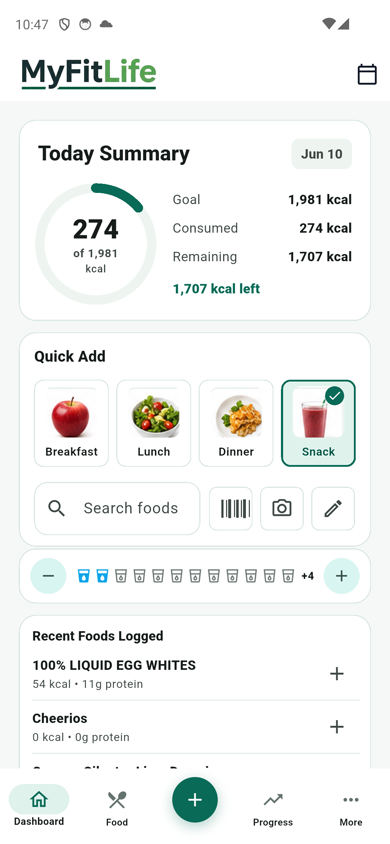
Can a calorie tracker show which foods drove your calories and macros? Yes—if it preserves a traceable path from each logged food to its meal, daily total, and time-based summary. In MyFitLife, the Calories, Protein, Carbs, and Fats detail pages let you inspect today’s quantity-adjusted food contributions, compare the current total with the daily goal, and review clearly defined Today, Week, and Month intervals. The answer is not an unexplained score: it is a calculation you can follow.
That visibility has an important limit. A tracker explains the data recorded in the tracker. It does not observe everything you ate, confirm that a database result matched the package or preparation, or prove that a day was completely logged. The most useful breakdown therefore answers “Which entries produced this displayed total?” while keeping “What did I actually consume?” as a separate question that still depends on the quality and completeness of the food record.
A useful total needs a traceable path
A calorie or macro total is an aggregate: one number produced from several inputs. Explainability begins by retaining those inputs at useful levels. MyFitLife represents a food with calorie, protein, carbohydrate, and fat values plus a logged quantity. Foods are grouped into meal buckets. Meal totals are recalculated from their food items, and the nutrition day is recalculated from its meals. The metric detail page can then select the same field—calories, protein, carbs, or fats—at every level.
For a food item i with logged quantity qi, MyFitLife calculates that item’s contribution by multiplying the item’s stored per-serving value by qi. A meal contribution is the sum of its item contributions. The day total is the sum of its meal contributions. The same structure is used independently for each supported metric:
- Calories: item calories × quantity → meal calories → daily calories.
- Protein: item protein × quantity → meal protein → daily protein.
- Carbohydrate: item carbs × quantity → meal carbs → daily carbs.
- Fat: item fats × quantity → meal fats → daily fats.
This does not require calorie estimates to be reverse-engineered from the three macro fields. Each displayed metric follows its own stored value. That matters because label rounding, fiber, sugar alcohols, alcohol, organic acids, database conventions, and incomplete data can keep a simple four-calories-per-gram or nine-calories-per-gram reconstruction from matching a label exactly. MyFitLife shows the recorded calorie field as calories and the recorded macro fields as grams instead of claiming that one was mathematically proven by the others.
How MyFitLife shows today’s contributors
Tap Calories, Protein, Carbs, or Fat from the Dashboard—or the corresponding Macro Targets row on Progress—to open its detail page. The top card shows the current value, daily goal, and percentage. Today’s Log then shows the current total, the goal, and either the amount remaining or the amount over the target. Beneath that summary, nonempty meals are shown with their metric subtotal.
Each food row names the logged item, shows its serving quantity, and reports that food’s contribution to the selected metric. Change from Calories Details to Protein Details and the grouping remains the same while the contribution column changes from kilocalories to grams of protein. This is more actionable than a single ring because an unexpected total can be traced to a particular item, quantity, or meal rather than attributed vaguely to “the day.”
Why serving quantity changes every downstream number
The FDA explains that Nutrition Facts values are tied to the label’s serving size and that serving size is not a recommendation for how much to eat. If a stored food describes one serving but the log records 1.5 servings, the tracker needs to scale every available nutrient consistently. MyFitLife’s food model does that before the values are added to meal and daily totals.
The arithmetic can be correct while the input is wrong. A quantity of two attached to the wrong product still produces a precise-looking but inaccurate result. USDA FoodData Central also contains several data types with different sources, update schedules, portions, and food descriptions. For repeat packaged foods, compare the selected entry with the current package label; for generic foods, check that the description and preparation state match what was logged.
What Today, Week, and Month actually measure
Today is the current local date. Its overview chart uses meal contributions, so it answers where today’s selected metric came from across the logged meals. Week is not the current calendar week: it is the trailing seven local calendar dates, inclusive of today. Each date receives a point, and a date without a recognized log is shown as No log rather than as a zero-height intake claim.
Month begins on the first local date of the current month and ends today. Its compact chart groups those dates into sequential seven-day blocks labeled W1, W2, and so on; the final block can be shorter. The details sheet still lists each individual date in the interval. Dates from the previous month and future dates are excluded, even if history data for them is available.
For Week and Month, MyFitLife calculates total = sum of the selected metric on logged days and average = total ÷ number of logged days. It does not divide by every calendar date in the range. The details sheet exposes the average logged day, the total, and the number of logged days that reached the applicable goal. This interval definition makes two questions visible at once: what the available logs contain, and how much of the interval actually contains a log.
Why “No log” is not the same as zero intake
Suppose a seven-day view contains protein logs of 80, 100, and 120 grams on three dates, with no recognized nutrition log on the other four. The MyFitLife average is 100 grams per logged day: (80 + 100 + 120) ÷ 3. Dividing by all seven dates would produce about 43 grams per calendar day, but that result would silently assume the four missing dates represented zero protein intake. The records do not support that assumption.
An explicit log can still contain zero for the selected metric. For example, a day with logged food but zero recorded protein is a logged day with a zero protein value; an absent day is No log. That distinction is a missing-data rule, not a claim that the logged day was complete. The National Cancer Institute notes that food records remain vulnerable to omitted foods, reporting error, coding error, reactivity, and day-to-day variation. “Logged” means data exists, not that objective intake has been established.
How changing calorie goals are handled
A contribution answers how much was logged; a goal comparison answers whether that value crossed a configured threshold. Those are separate calculations. Protein, carb, and fat history use the profile goals supplied to the detail page. Calories can also use MyFitLife’s Health Central target system when calorie adjustment is enabled: today uses the live applied target, while historical comparisons can use a stored target for each date.
That historical handling prevents a later target from silently rewriting an earlier comparison. If a date had an applied 2,400-kilocalorie target, its status should not be judged against a different target merely because the profile changed later. When required Health target history is still loading or unavailable, MyFitLife withholds the Week or Month calorie-goal calculation and says why, while keeping today’s live goal available. It does not present a fallback as if it were verified target history.
How to audit a surprising calorie or macro total
- Open the detail page for the metric that looks wrong; do not try to diagnose all four metrics at once.
- Check Current total, Daily goal, and Remaining or Over target so you know which values are being compared.
- Review meal subtotals to find the meal that contributes most to the displayed difference.
- Inspect each food name, serving quantity, and metric contribution within that meal.
- For a packaged food, compare the stored serving basis and nutrient values with the current Nutrition Facts label. For a generic food, verify the FoodData Central description and preparation state when appropriate.
- Correct the food or quantity through the normal food-log workflow, then confirm that the item, meal, and day totals move together.
- When comparing Week or Month, open the details sheet and count logged versus No log dates before interpreting the average.
- If the question concerns a nutrient target, medical condition, medication, symptoms, or treatment, take the record to a qualified clinician or registered dietitian rather than treating the app’s threshold as medical advice.
What the breakdown can—and cannot—tell you
- It can identify which logged foods and meals contributed to today’s calories, protein, carbohydrate, or fat.
- It can show the stored quantity-adjusted value for each item and the subtotal for each nonempty meal.
- It can compare today with a configured goal and distinguish Remaining from Over target.
- It can summarize a trailing seven-date window and the current month through today.
- It can preserve No log as missing rather than converting absence into reported zero intake.
- It cannot prove that the selected database item, serving, recipe, or preparation matched what was consumed.
- It cannot identify omitted foods, establish that a logged day was complete, or turn a logged-day average into usual intake.
- It cannot diagnose a condition, prescribe a target, explain a symptom, or establish that calories or macros caused a weight or health outcome.
Digital self-monitoring has been studied as part of behavioral weight-management interventions, and systematic reviews have reported associations between greater engagement and weight outcomes. That evidence supports logging as a potentially useful behavior tool; it does not make every app entry objective, guarantee weight change, or show that a particular food caused an outcome. The breakdown is strongest as an audit trail and pattern-review aid.
Accuracy, privacy, and a healthy stopping rule
Food logs can become more useful when they are consistent enough to compare, but more detail is not automatically better. If tracking creates anxiety, guilt, rigidity, or compensatory behavior, stop and seek appropriate support. NIMH describes eating disorders as serious illnesses, and calorie or macro tracking is not appropriate for everyone without individualized guidance.
Nutrition history can also reveal routines and wellness information. MyFitLife associates nutrition records with the signed-in account, and its Privacy Statement describes how personal information is handled. Use device protections, avoid placing unnecessary medical narratives in food names, and review the current policy before entering sensitive information.
MyFitLife is a general-wellness app, not a medical device or substitute for a physician or registered dietitian. A technically transparent total can improve a conversation, but transparency does not convert self-reported food data into a diagnosis, laboratory measurement, or personalized treatment plan. The right stopping point is the strongest conclusion the stored data actually supports.
The MyFitLife answer
MyFitLife answers “Can a calorie tracker show which foods drove your calories and macros?” with a visible calculation chain. Open Calories, Protein, Carbs, or Fats Details. Today’s Log shows the selected metric’s current total, daily goal, remaining or over-target amount, meal subtotals, and every logged food’s quantity-adjusted contribution. Today’s overview groups the metric by meal; Week covers the trailing seven dates; Month covers the first of the current month through today.
The longer intervals keep absence explicit. Averages use recognized logged days, No log dates remain visible, and the details sheet shows total, average logged day, and goal-count context. Historical calorie comparisons use applicable stored targets when Health Central adjustment history is available and withhold unsafe history calculations when it is not. The result does not claim to know unlogged intake or validate every source value. It gives users something more defensible: a direct path from the number on the screen back to the records that produced it.
Sources and further reading
- How to Understand and Use the Nutrition Facts Label U.S. Food and Drug Administration
- Serving Size on the Nutrition Facts Label U.S. Food and Drug Administration
- 21 CFR 101.9 — Nutrition Labeling of Food Electronic Code of Federal Regulations
- FoodData Central Data Type Documentation U.S. Department of Agriculture
- Self-Monitoring via Digital Health in Weight Loss Interventions: A Systematic Review Among Adults with Overweight or Obesity Obesity via PubMed
- Does self-monitoring diet and physical activity behaviors using digital technology support adults with obesity or overweight to lose weight? A systematic literature review with meta-analysis Obesity Reviews via PubMed
- Dietary Assessment Primer: Food Record Validation National Cancer Institute
- Eating Disorders National Institute of Mental Health
- General Wellness: Policy for Low Risk Devices U.S. Food and Drug Administration
- MyFitLife Privacy Statement MyFitLife
- MyFitLife Health Disclaimer MyFitLife
Related articles
- Why Does a Food Barcode Scanner Show the Wrong Calories—and How Can You Verify the Entry?
- How to Track Macros Without Overcomplicating Your Day
- Can a Food Tracker Show Past Meals and Calories?
Install free. Keep the core tracker free.
Log food, scan barcodes, track macros, and review progress without starting a subscription.