Can a Food Tracker Show Past Meals and Calories?
Learn when a food tracker can show exact past meals and calories, why some older days remain totals-only, and how MyFitLife preserves honest history.
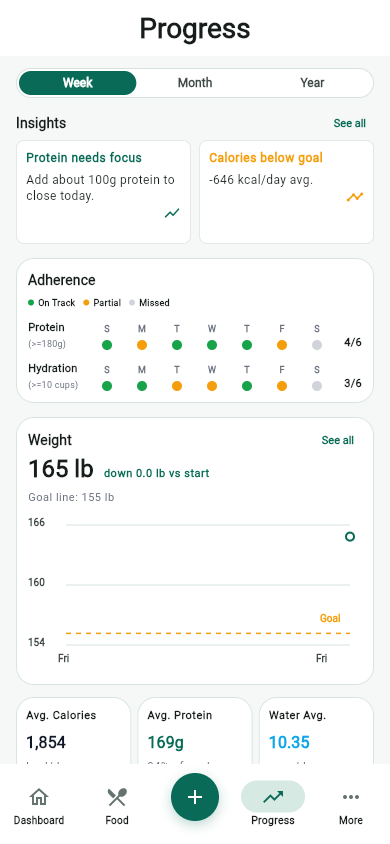
Can a food tracker show past meals and calories? Yes—when the underlying record contains the foods that were logged. MyFitLife History can open a past day, show its calorie and macro totals, and, for days with stored item snapshots, group the exact logged foods under their recorded meals. Older records that contain only aggregate totals stay totals-only. MyFitLife does not reconstruct or invent a breakfast, lunch, dinner, or snack to explain numbers that were saved without item detail.
That boundary is important. A food diary is a record of user-entered data, not a camera pointed at everything a person ate. It can answer “What did I log last Tuesday?” and show what you logged more reliably than “What did I eat last Tuesday?” The second question assumes every food was entered accurately and completely. MyFitLife preserves the distinction so historical detail is useful without being presented as proof of real-world intake.
What can a food tracker know about a past day?
A tracker knows the fields stored in its data model. For a detailed nutrition day, those fields can include a local date, daily calories, protein, carbohydrates, fat, water, meal names, food names, serving quantities, and item-level nutrient values. The interface can organize and calculate from those records. It cannot observe an unlogged snack, verify that a selected database food matched the plate, or determine whether the recorded serving equaled the amount consumed.
This is the difference between a record and an inference. “Turkey bowl, one serving, logged under Dinner” is a record when that item snapshot exists. “The user ate a turkey bowl for dinner” is an inference about behavior. It may be reasonable for personal review, but the app cannot prove it. The technically accurate wording is that the history shows the foods and amounts logged for that date.
Daily totals and item snapshots are different layers
A daily aggregate stores the result of addition: for example, 1,800 calories, 120 grams of protein, 190 grams of carbohydrate, and 60 grams of fat. An item snapshot stores the inputs that contributed to a meal when the record was created: food name, quantity, calories, and macros, grouped into meal buckets. The aggregate is compact and still useful for trends. The snapshots are what make a human-readable past-meal breakdown possible.
Keeping both layers is a sound data-design choice because they answer different questions. Totals support charts, averages, and target comparisons without requiring every item to be rendered. Snapshots support provenance: a user can inspect which recorded foods produced the displayed day. MyFitLife does not treat the richer representation as if it had always existed. The history reader checks whether item detail is actually present and selects the appropriate presentation.
What a detailed MyFitLife history day shows
In More > History, selecting a snapshot-backed day opens a read-only detail sheet. The top summary shows calories, protein, carbohydrates, fat, water, and the number of logged items. Beneath that summary, MyFitLife groups nonempty meal buckets such as Breakfast, Lunch, Dinner, or Snack. Each row identifies the stored food, its serving quantity, total calories, and its protein, carbohydrate, and fat values.
The same day-details presentation is reused from Progress history. That shared component matters technically and editorially: a day should not tell two different stories depending on which navigation path opened it. The full History view can also organize archived dates with time filters, while Progress provides a recent trend-oriented entry point. Both routes lead to the same underlying read-only interpretation of the selected nutrition record.
Why the meal grouping is useful
A single calorie number cannot show how a day was structured. Grouping logged items by meal can reveal that most recorded protein appeared at dinner, that a repeated breakfast changed serving size, or that a restaurant meal was entered as one composite item rather than its components. Those observations can make a personal review more concrete, but they are descriptions of the log—not judgments about food quality or conclusions about health.
Meal grouping also improves traceability when a total looks surprising. Instead of guessing why the day is high or low, a user can inspect the foods that were actually stored and review their quantities. The source data may still contain a mismatched product, label, preparation method, or serving. History exposes the record; it does not retroactively validate every nutrition value inside it.
Serving quantities make historical calories interpretable
Calories without a serving basis are difficult to audit. The FDA distinguishes a labeled serving size from the amount a person chooses to eat, and nutrition databases may describe food per serving, per 100 grams, or in another unit. MyFitLife retains the logged quantity with a detailed food snapshot and displays item totals calculated for that quantity. A fractional quantity can therefore remain visible rather than being rounded into a different meal history.
The stored quantity is still only as good as the original entry. If someone selected two servings but ate one, used a raw-food record for a cooked amount, or chose a similarly named product with different nutrition, the historical calculation preserves that input; it cannot correct the real-world mismatch automatically. When precision matters, compare repeat packaged foods with the current Nutrition Facts label and use an appropriate measuring method.
Why some older days show totals only
Software schemas evolve. An earlier version of a system may archive daily calories and macros without persisting the meal and food snapshots needed for a detailed reconstruction. Those aggregate-only records are not corrupt simply because they contain less detail. They can still support a daily total or a longer-term average. What they cannot support is a trustworthy list of the foods behind that total.
For such a day, MyFitLife keeps the calories and nutrient totals visible and explicitly says that item details are not available. It does not distribute the calories across invented meals, query current favorites and pretend they were historical foods, or reverse-engineer likely items. The fallback is intentionally less detailed because that is the strongest claim the stored evidence supports.
Why reconstructing missing meals would be misleading
Many combinations of foods can produce similar calorie and macro totals. A 600-calorie aggregate might represent one restaurant entrée, several snacks, or a home-cooked meal with multiple ingredients. Even matching calories, protein, carbohydrate, and fat does not identify a unique set of foods. Reconstructing meals from those totals would be an underdetermined inverse problem, not data recovery.
Current saved meals, recent foods, or frequent patterns do not solve the problem. They may have changed since the archived date, and similarity is not provenance. A technically responsible history feature distinguishes “not stored” from “empty.” MyFitLife’s totals-only state communicates that the day has aggregate data but lacks the item snapshots required to name past foods.
No migration, backfill, or new write is required
The History improvement is a read-path enhancement. It uses existing owner-scoped nutrition records, displays stored snapshots when present, and retains the existing aggregate fallback when they are absent. Opening a day does not create nutrition entries, rewrite the archive, migrate an old schema, or backfill guessed items. That means reviewing history cannot silently change the evidence being reviewed.
This separation reduces risk. Read operations can evolve to present existing data more clearly without introducing a mutation path into a browsing surface. It also makes testing specific: a detailed fixture must render its exact meal and food, while an aggregate-only fixture must render its totals and the unavailable-detail message. Both states are valid, and neither should be transformed into the other merely to make the interface look complete.
A practical way to audit a past food log
- Choose the date and first note whether the day contains item detail or only aggregate totals. Do not treat those two evidence levels as equivalent.
- For a detailed day, scan the meal headings and confirm that the stored food names correspond to what you remember logging.
- Review serving quantities before interpreting calories or macros. Check current package labels or USDA FoodData Central when a repeat entry appears mismatched.
- Look for omissions without assuming that a blank meal means no food was eaten. It may mean nothing was logged under that meal.
- Compare patterns across several adequately recorded days rather than drawing a conclusion from one unusually complete, incomplete, high, or low day.
- Keep questions that depend on diagnosis, treatment, medication, or individualized dietary requirements for a qualified healthcare professional.
How to read averages without hiding missing data
History can summarize logged days, including measures such as average calories or protein. An average describes the records included in that calculation; it does not prove that every calendar day was recorded or that every included day was complete. A low value may reflect genuinely lower logged intake, a partial day, or missing foods. The number alone cannot select among those explanations.
Digital self-monitoring research supports food logging as a useful component of many behavioral interventions, but it does not turn incomplete self-report into objective intake measurement or guarantee an outcome for an individual. The National Cancer Institute’s Dietary Assessment Primer describes underreporting, day-to-day variation, recording errors, and coding errors as limitations of food records. Before comparing weeks, check how many days were logged, whether the entry routine was reasonably consistent, and whether a change in database item or serving convention created an artificial difference.
What history can reveal—and what it cannot
- History can show the dates, totals, meal buckets, foods, quantities, and nutrient values that were stored for the signed-in user when those fields are available.
- History can help find repeated entries, serving changes, incomplete days, and patterns worth discussing or reviewing.
- History cannot prove that every logged item was eaten, that every eaten item was logged, or that the stored food matched the actual product and portion.
- History cannot recover item detail from an aggregate-only day, diagnose a condition, measure metabolism, or establish why weight or symptoms changed.
- History should support a question or habit review, not be presented as an objective surveillance record or clinical nutrition assessment.
Privacy belongs in the data model and the explanation
Food history can reveal routines, preferences, dates, and wellness information. MyFitLife history remains tied to the authenticated user’s owner-scoped nutrition read model, and the public Privacy Statement explains how MyFitLife handles personal information. Users should review that statement and their device protections before entering sensitive details. They should also avoid placing unnecessary medical narratives into ordinary food names or notes.
A trustworthy product explanation should not imply that richer history requires broader collection. This feature reads the nutrition data already associated with the account; it does not need a new migration or speculative backfill. Read-only presentation also means the detail sheet is not an editing shortcut. Changes to current or historical nutrition, where supported elsewhere, should use the product’s explicit write workflows and their validation rather than a display-only surface.
Use history as a general-wellness record
MyFitLife is a general-wellness iOS and Android app, not a medical device, diagnostic system, or substitute for a physician or registered dietitian. A food log can help organize behavior and prepare better questions. It does not establish nutrient deficiency, allergy safety, blood-glucose response, kidney or heart risk, an eating-disorder assessment, or the correct intake for a medical condition.
If a clinician or registered dietitian uses a food record in your care, follow the recording and interpretation method they provide. If detailed tracking increases anxiety, rigidity, guilt, or compensatory behavior, pause and seek appropriate support; NIMH explains that eating disorders are serious illnesses and that treatment is available. More historical detail is not automatically healthier or more useful for every person.
The MyFitLife answer
MyFitLife answers “Can a food tracker show past meals and calories?” with evidence-matched history. Open a stored day from History or Progress. Every qualifying day shows its recorded calorie, macro, and water totals. When item snapshots exist, MyFitLife shows the exact logged foods, their serving quantities and nutrient values, grouped under the meals in which they were recorded. When only an aggregate exists, the day remains totals-only and clearly says that item details are unavailable.
That is a more useful answer than pretending every historical number has a recoverable menu behind it. The detailed view supports review and traceability; the fallback preserves older records without fabrication; and the read-only design adds no migration, backfill, or hidden write. Most importantly, the screen answers what the data can support: what was logged in MyFitLife, not proof of everything that was eaten. For personal pattern review, that honest boundary is a feature, not a limitation to disguise.
Sources and further reading
- Dietary Guidelines for Americans, 2025-2030 U.S. Department of Health and Human Services and USDA
- How to Understand and Use the Nutrition Facts Label U.S. Food and Drug Administration
- Serving Size on the Nutrition Facts Label U.S. Food and Drug Administration
- FoodData Central U.S. Department of Agriculture
- Self-Monitoring via Digital Health in Weight Loss Interventions: A Systematic Review Among Adults with Overweight or Obesity Obesity via PubMed
- Does self-monitoring diet and physical activity behaviors using digital technology support adults with obesity or overweight to lose weight? A systematic literature review with meta-analysis Obesity Reviews via PubMed
- Dietary Assessment Primer: Food Record Validation National Cancer Institute
- Eating Disorders National Institute of Mental Health
- General Wellness: Policy for Low Risk Devices U.S. Food and Drug Administration
- Mobile Health App Interactive Tool Federal Trade Commission
- MyFitLife Privacy Statement MyFitLife
- MyFitLife Health Disclaimer MyFitLife
Related articles
- Should You Judge Weight Loss by One Weigh-In or a Trend?
- Can a Supplement Tracker Handle Multiple Doses and Label Scanning?
- Can a Calorie Tracker Show Which Foods Drove Your Calories and Macros?
Install free. Keep the core tracker free.
Log food, scan barcodes, track macros, and review progress without starting a subscription.