Can a Supplement Tracker Handle Multiple Doses and Label Scanning?
Learn how MyFitLife tracks separate supplement doses, searches NIH DSLD labels by barcode or photo, protects label images, and preserves safety limits.
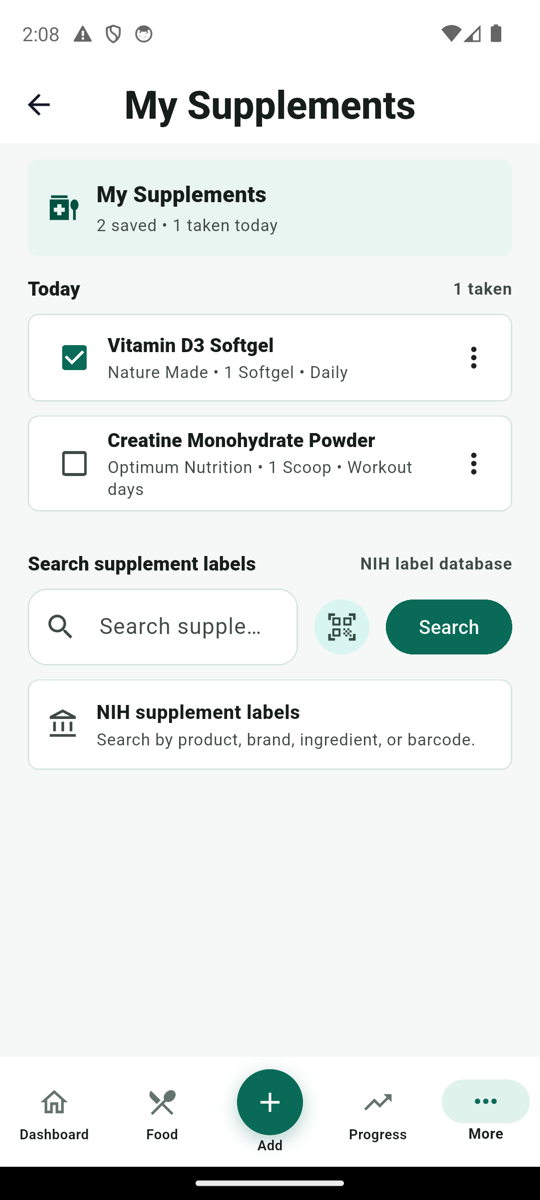
Can a supplement tracker handle multiple doses and label scanning? Yes—if it treats the product, its schedule, and each daily dose as different records. MyFitLife lets a signed-in user search NIH Dietary Supplement Label Database records by product, brand, ingredient, or barcode; use an optional label photo to find possible DSLD matches; save a reviewed product; create multiple weekday and time-based dose slots; record each occurrence as Planned, Taken, Skipped, Missed, or As needed; and review recent history. It does not select a dose, verify ingestion, detect an interaction, or decide that a supplement is safe or effective. A match is a starting point for review, not a medical conclusion.
That distinction matters because “take this supplement twice daily” is not one checkbox. It is a product identity, a plan containing two separate schedule slots, and two events that can have different outcomes. The morning occurrence might be recorded as Taken while the evening occurrence is recorded as Skipped. A useful tracker must preserve both events without allowing one tap, edit, or undo action to overwrite the other.
Why one daily supplement checkbox is not enough
A single daily state works only for the simplest routine. It becomes ambiguous when the same product has morning and evening doses, different weekday instructions, a separate workout-day plan, or an as-needed use. If the tracker stores only “vitamin taken today,” it cannot say which planned occurrence the user meant. Reversing that entry could also erase the wrong event.
MyFitLife solves that data problem with occurrence-level identity. A scheduled occurrence combines the saved supplement, the user’s local calendar date, and a stable schedule-slot identifier. Morning and evening doses therefore remain independently addressable even when they refer to the same bottle. Marking or undoing one occurrence leaves the other intact. This is an implementation detail with a practical result: “one product, two doses” remains two observable decisions rather than collapsing into a single daily answer.
Separate the label, the plan, and the event
The first layer is product identity. A saved DSLD record can include the product name, brand, supplement form, serving description, barcode, ingredients, labeled amounts, statements, warnings, and a source citation. Those fields describe what a particular label reported when it entered the database. They do not establish appropriate use, current formulation, or verified contents.
The second layer is the user’s schedule. Each MyFitLife dose slot contains its own dose label, selected weekdays, optional local time, enabled state, and stable slot ID. “One capsule at 08:00 Monday through Friday” and “two capsules at 18:00 Saturday and Sunday” are different schedule slots even when both belong to the same saved supplement. The schedule records a plan supplied by the user; MyFitLife does not create a medically appropriate regimen.
The third layer is the occurrence log. It records the date, supplement, schedule slot, status, displayed dose, optional scheduled time, and the time a Taken or As needed event was recorded. This layer answers what the user entered for a particular occurrence. It does not prove that a capsule was swallowed, that the labeled amount was delivered, or that the body absorbed or benefited from it.
How multiple-dose scheduling works
In My Supplements, a user can save a product and add one or more dose slots. Each slot requires a dose description and at least one weekday; its local time is optional. The app shows only enabled slots that apply to the current weekday. A product with morning and evening slots therefore creates two rows for today, while a weekend-only slot stays out of a weekday view. Schedule changes are described as applying to future tracking so an edited plan does not silently rewrite prior history.
The time field is a schedule label, not a guaranteed medication alarm. MyFitLife’s supplement workflow should not be described as a prescription timer, clinical reminder system, or medication administration record. A displayed local time organizes the routine; it does not determine whether taking the product then is safe.
MyFitLife also preserves compatibility with older records that stored one same-day entry per supplement. On the first occurrence-aware update, the matching legacy entry is replaced rather than retained as an extra scheduled dose. That migration rule prevents an older checkbox from becoming a phantom third dose when a user moves to a multi-slot schedule.
What the five dose statuses mean
- Planned: the occurrence remains represented as part of the schedule, without claiming that it was completed.
- Taken: the user recorded that this specific occurrence was taken.
- Skipped: the user intentionally recorded that the occurrence was not taken.
- Missed: the user recorded the planned occurrence as missed.
- As needed: the user recorded an unscheduled or conditional use; it is reported separately from scheduled-dose adherence.
These statuses preserve information that a binary checkbox loses. Skipped and Missed are not interchangeable, while As needed should not inflate or reduce a scheduled-dose denominator. MyFitLife’s history summary counts Taken, Planned, Skipped, and Missed scheduled events and reports As needed events separately. The resulting percentage is an operational summary of entered records—not a clinical adherence score, treatment assessment, or safety signal.
An absence of interaction is not automatically a Missed dose. The tracker cannot know whether the user forgot the supplement, forgot the app, changed the plan, or followed advice recorded elsewhere. Use an explicit status when the distinction matters, and leave uncertainty visible rather than reconstructing a cleaner story later.
Barcode lookup and label-photo matching are different tools
A barcode scan turns the printed digits into a direct DSLD search. It can quickly narrow the search when the database contains that identifier, but a barcode is not a safety seal and a missing result does not mean the product is invalid. MyFitLife tells the user when a barcode is not found and suggests searching by brand or product name instead.
A label photo follows a broader identification pipeline. After the user chooses the camera or photo library, MyFitLife sends a supported image through its authenticated backend. An AI model is constrained to propose only identity clues: product, brand, barcode, short label text, and confidence. The backend turns those clues into bounded DSLD searches, deduplicates matching label IDs, and returns possible database records. The app then asks the user to review those candidates before saving or logging anything.
- A photo can suggest several candidates rather than forcing one answer.
- Unreadable fields may remain empty; the model is instructed not to invent a barcode.
- The model is not asked for dosage, safety, efficacy, interaction, medical, or nutrition advice.
- If processing fails or no DSLD match is found, MyFitLife returns an explanation instead of saving an invented product.
- The final selection remains a user decision based on the actual package.
This is label identification, not full label transcription and not product authentication. Similar branding, multiple strengths, reformulations, package-size differences, and old versus current labels can all produce a plausible but wrong candidate. Compare the exact product name, brand, form, barcode, serving size, ingredient amounts, warnings, and other distinguishing package details before choosing a result.
What NIH DSLD data can—and cannot—tell you
The NIH Office of Dietary Supplements says DSLD captures information printed on dietary supplement labels marketed in the United States, including label images, ingredient names and forms, amounts, and statements. It contains both current and historical records and can mark products as on market or off market. That makes it useful for identifying a labeled product and preserving the provenance of label facts.
DSLD also warns that manufacturers or distributors are responsible for the underlying label information, which may be incomplete or inaccurate, and that inclusion is not an endorsement or guarantee. A product can be reformulated while retaining familiar branding. Use the current bottle as the immediate comparison source, note the DSLD record’s identity and market status, and consult FDA alerts or recalls when safety is in question.
The privacy boundary for a supplement label photo
“Processed transiently” does not mean “never leaves the device.” The selected image is uploaded to MyFitLife’s authenticated backend and processed by an AI service so identity clues can be extracted and compared with NIH DSLD data. MyFitLife’s current application contract does not write the uploaded label image or extracted label text to Firestore, and the supplement-photo response does not contain the original image.
If the user chooses a result, the saved record contains the selected DSLD label information and the schedule or occurrence data needed for the feature. Operational services may also process limited security, quota, timing, size, and error metadata as described in the Privacy Statement. The article must not claim that all providers instantly erase every transient byte or that the photo is analyzed entirely on-device; neither statement is established by the feature contract.
Use the smallest image needed for identification. Keep faces, prescription labels, addresses, patient paperwork, and unrelated personal information outside the frame. Photo matching is optional: product-name search and barcode search remain available when the user does not want to submit an image.
A safe workflow for setting up supplement tracking
- Start with the exact container in hand. Confirm the product name, brand, form, serving definition, ingredient amounts, warnings, lot details, and expiration information that matter to your question.
- Search by product or brand, scan the barcode, or optionally submit a tightly cropped label photo to request possible DSLD matches.
- Compare every candidate with the current package. Reject close matches with a different strength, form, serving size, formulation, barcode, or market status.
- Save only the reviewed label record. Treat its fields as label facts rather than independent laboratory verification or an endorsement.
- Create schedule slots only for a regimen you have already decided to follow using the physical label and qualified professional guidance when appropriate. MyFitLife does not choose the regimen.
- Give every slot a clear dose label, applicable weekdays, and an optional local time. Keep separate morning, evening, workout-day, or other distinct occurrences separate.
- Record Taken, Skipped, Missed, Planned, or As needed for the specific occurrence. Do not mark Taken merely to clear the row or retroactively guess at uncertain days.
- Review recent history for recordkeeping gaps and routine questions, and keep a complete supplement-and-medicine list for conversations with a physician, pharmacist, registered dietitian, or other qualified professional.
How to interpret supplement history without overclaiming
MyFitLife offers a recent history view with logged-event counts and a scheduled-dose summary. That can reveal operational patterns: an evening slot is frequently marked Missed, a weekend schedule no longer fits, or an As needed product is being recorded more often than expected. Those are prompts to review the routine. They do not show why the pattern occurred, whether the planned regimen was correct, or whether the supplement produced a health outcome.
Do not compare a dose-status trend with weight, symptoms, sleep, laboratory values, or performance and conclude that the supplement caused the change. Timing and correlation are not causal evidence. The useful output is a more specific question: Which exact product and schedule were recorded, how complete is the history, and what should be discussed with the professional who understands the user’s conditions, medicines, diet, and goals?
Safety decisions remain outside the tracker
FDA does not approve dietary supplements for safety and effectiveness before they are marketed in the same way it approves drugs. Supplements can have biological effects, interact with prescription or over-the-counter medicines, complicate surgery, or be inappropriate during pregnancy, breastfeeding, childhood, or particular medical conditions. A label record, high-confidence photo match, consistent Taken history, or familiar brand does not resolve those risks.
- Do not use MyFitLife to start, stop, replace, or change a medicine or supplement.
- Do not infer a safe dose from a database record or an AI-selected candidate.
- Seek individualized guidance for interactions, symptoms, pregnancy, breastfeeding, surgery, chronic conditions, abnormal laboratory results, or complex medication regimens.
- For a suspected serious reaction, stop using the product, obtain appropriate medical care, and follow FDA guidance for reporting a dietary supplement problem.
- Use emergency services for urgent symptoms; a wellness tracker is not emergency support.
The NIH Office of Dietary Supplements provides a supplement-and-medicine record that includes product, active ingredients, dose, timing, start and stop dates, reason for use, and the person who recommended it. MyFitLife can contribute precise product and occurrence history to that conversation, but it does not replace a complete medication list or a clinician’s review.
The MyFitLife answer
MyFitLife answers the multiple-dose problem by modeling each scheduled dose as its own occurrence. A saved supplement can have distinct weekday and time slots, and each occurrence can retain its own Planned, Taken, Skipped, Missed, or As needed status. Stable occurrence identity prevents one dose from overwriting another, recent history makes entered patterns reviewable, and older same-day records transition without becoming duplicate scheduled events.
It answers the label-scanning problem with a reviewable evidence chain: optional barcode or photo input, tightly limited AI identity extraction, candidate searches against NIH DSLD, explicit user selection, source-preserving label data, and visible safety and privacy boundaries. That is what a technically responsible general-wellness supplement tracker can do well—organize the exact label, plan, and self-reported event. Dosage, interactions, diagnosis, treatment, and individualized safety still belong with qualified healthcare professionals.
Sources and further reading
- Dietary Supplement Label Database (DSLD) NIH Office of Dietary Supplements
- Dietary Supplement Label Database API NIH Office of Dietary Supplements
- Dietary Supplement Labeling Guide U.S. Food and Drug Administration
- Dietary Supplements: What You Need to Know NIH Office of Dietary Supplements
- My Dietary Supplement and Medicine Record NIH Office of Dietary Supplements
- FDA 101: Dietary Supplements U.S. Food and Drug Administration
- Mixing Medications and Dietary Supplements Can Endanger Your Health U.S. Food and Drug Administration
- How Medications and Supplements Can Interact National Center for Complementary and Integrative Health
- How to Report a Problem with Dietary Supplements U.S. Food and Drug Administration
- MyFitLife Privacy Statement MyFitLife
- MyFitLife Health Disclaimer MyFitLife
Related articles
- Is There One App That Tracks Food, Water, Fasting, and Supplements Together?
- Should You Judge Weight Loss by One Weigh-In or a Trend?
- Can a Food Tracker Show Past Meals and Calories?
Install free. Keep the core tracker free.
Log food, scan barcodes, track macros, and review progress without starting a subscription.