Why Does a Food Barcode Scanner Show the Wrong Calories—and How Can You Verify the Entry?
Learn why a food barcode can return the wrong product, serving, or calories, and use a five-point verification checklist before saving the entry.
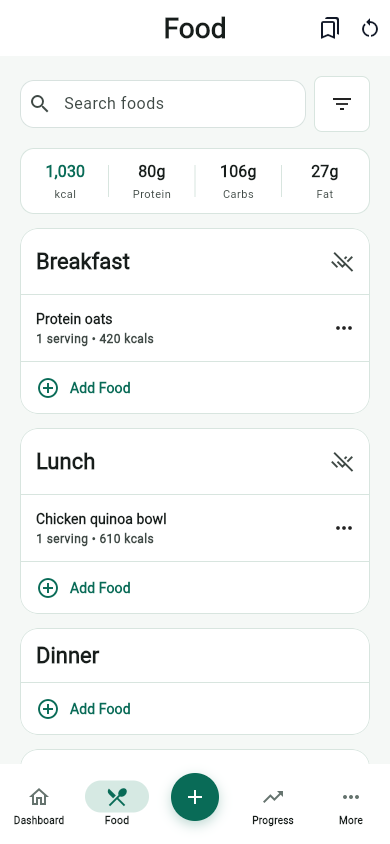
Why does a food barcode scanner show the wrong calories? Usually the scan found an identifier, but the nutrition record connected to that identifier is missing, outdated, from another market, or expressed in a serving unit that does not match what you ate. A barcode is not a miniature Nutrition Facts label. Verify the product name and package size, compare calories and nutrients with the current physical label, align the serving units, enter the amount actually consumed, and use search or manual entry when the record still disagrees. MyFitLife makes the scan fast, but the package remains the strongest available evidence for that specific packaged food.
That distinction explains why two apps can scan the same code and display different numbers without either camera misreading the black lines. The scan may be identical while the databases, update dates, regional records, and serving conversions behind the screens differ. A useful nutrition tracker should therefore show an editable result rather than treating barcode recognition as proof of nutritional accuracy. The technical task has two parts: identify the trade item, then retrieve and correctly interpret its food data.
What information is actually inside a food barcode?
On most retail foods, the familiar UPC or EAN symbol encodes a Global Trade Item Number, or GTIN. GS1 standards use that identifier so manufacturers, distributors, and retailers can refer to a trade item consistently. The number identifies a defined product and packaging level; it does not normally encode calories, protein, serving size, ingredients, allergens, or a complete formulation. A scanner reads the identifier, and software uses it as a lookup key to request those details from another data source.
Think of the GTIN as a library call number rather than the book. It can point a system toward a product record, but the usefulness of the answer depends on the catalog. The record may have been submitted by a brand, imported from a public source, transcribed by a contributor, or inferred from another listing. It may describe the exact package in your hand, a former formulation, or no product at all. The barcode also usually identifies the product class, not the individual package, so it does not reveal how much you poured or ate.
The barcode-to-calorie data pipeline
A calorie result appears simple, but it is the final value in a multi-stage pipeline. First, the phone camera detects and decodes the symbol. Second, the app normalizes the code and queries one or more product databases. Third, it selects a product record and reads its nutrition fields. Fourth, it interprets whether those fields are per serving, per 100 grams, per 100 milliliters, or for the whole package. Fifth, it converts that basis into the serving and quantity shown in the log. An error or unsupported assumption at any stage can change the displayed calories.
MyFitLife prefers product information from Open Food Facts and USDA FoodData Central. Open Food Facts provides a product endpoint that retrieves records by barcode, while FoodData Central provides branded and reference food data. These are valuable sources, but a returned record is still data to review. Coverage varies by country and product, branded foods change, fields can be incomplete, and public database entries may not match the newest label. Source provenance tells you where a value came from; it does not guarantee that the value matches this package today.
Six reasons the calories can be wrong
- Wrong trade item: the database links the code to a different flavor, package size, multipack, or product with a similar name. A convincing image is not enough; compare the exact description and net contents.
- Regional variation: a brand may sell visually similar packaging in different countries with different formulations, labeling rules, or nutrition units. Confirm that the record and label use the same market and measurement basis.
- Reformulation: the manufacturer changed ingredients, serving size, or nutrient values while an older database record remained available. The current package date and label should win over a stale listing.
- Incomplete or transcribed data: a product record may omit nutrients, place a decimal incorrectly, confuse kilojoules with kilocalories, or map values to the wrong field. Implausible totals are a reason to stop and inspect.
- Serving mismatch: the database reports values per 100 grams while the app shows one piece, or the label defines one serving as two pieces while the user assumes one. Correct product data can still produce an incorrect log when units are misaligned.
- Quantity mismatch: the selected serving may be accurate, but the amount eaten was different. A scan identifies the package; it cannot observe whether you consumed half a serving, two servings, or left part behind.
The serving and quantity errors are especially common because they can create a plausible-looking result. A value that is exactly half or double the label is often a unit problem rather than a bad calorie value. A huge result may reflect a whole-container entry. A small result may reflect one gram instead of one serving. Before searching for another product, compare the mathematical bases of the two numbers.
How to compare per-serving and per-100-gram data
Use one common unit. Suppose a label lists 210 calories per 55-gram serving, but a database record lists 382 calories per 100 grams. Convert the database value by multiplying 382 by 55 and dividing by 100. The result is 210.1 calories, which agrees after rounding. The two screens looked different because one described 100 grams and the other described the label serving. If you ate 82.5 grams, or one and a half label servings, the estimated entry would be about 315 calories.
The same approach works for protein, carbohydrate, fat, sodium, and other nutrients, provided the units are compatible. Do not compare grams with milliliters without an appropriate product-specific density. FDA guidance also distinguishes serving size from a recommended amount: the serving printed on a Nutrition Facts label reflects a standardized reference for what people typically consume, while your log should record the amount you actually consumed.
The five-point Barcode Entry Verification Checklist
- Identity: Match the brand, product name, flavor or variety, package size, and barcode digits. Reject a near match even when the photo or name looks familiar.
- Label basis: Determine whether both the app and package report per serving, per 100 grams, per container, or another unit. Convert to a common basis before deciding they conflict.
- Nutrition: Compare calories and the macronutrients most relevant to the entry. Check sodium, added sugars, fiber, or other fields when those values influence your goal or professional guidance.
- Quantity: Enter what you actually ate using servings, pieces, grams, ounces, or milliliters. When accuracy matters and the food is practical to weigh, a measured amount reduces ambiguity.
- Source decision: Keep the scanned record only if the identity, units, values, and quantity are coherent. Otherwise choose a stronger database match, create a manual entry from the current label, or document the estimate as uncertain.
This checklist is deliberately short enough to repeat. It separates lookup accuracy from intake accuracy: a perfect product match can still be logged in the wrong amount, and a measured amount cannot repair a mismatched product. For a food you use often, spending an extra minute on the first verified entry can make future logging faster. Recheck when the package design, serving size, ingredients, or nutrition values change.
Use confidence signals without turning them into guarantees
A good result has several independent signals pointing in the same direction: the exact barcode and package match, the source is named, the serving basis is clear, calories are consistent with protein, carbohydrate, fat, and alcohol when available, and the values resemble the physical label after rounding. A weak result may have a generic product name, no serving weight, missing nutrients, contradictory units, or an estimated source. Confidence is a reason to allocate review effort; it is not a certification mark.
- High confidence: exact product identity, current label agreement, clear units, and a quantity that reflects what was consumed.
- Medium confidence: likely product match with one correctable gap, such as a missing household measure that can be converted from grams.
- Low confidence: generic or AI-derived match, incomplete fields, mismatched package details, implausible calorie-to-macronutrient relationships, or no way to verify the serving.
When search or manual entry is the better tool
A barcode is useful for a packaged product only when its linked record is trustworthy. Use food search for unpackaged basics such as produce, cooked grains, or a generic cut of meat, where a USDA reference entry and a measured portion may be more appropriate than a code on a store sticker. Use a saved recipe for a repeated homemade dish. Use manual entry from the package when the exact product is absent or outdated. For restaurant or prepared foods, use published nutrition when available and recognize that preparation can still vary.
MyFitLife may use Gemini as a low-confidence fallback when primary barcode data are weak. That fallback is intended to keep a failed lookup from becoming a dead end, not to convert uncertain product information into fact. AI can propose an identity or nutrition estimate, but it cannot inspect a hidden formulation or confirm the package in your hand. Review any estimated result more carefully and replace it with label-based or authoritative database information whenever available. Research on AI dietary assessment supports using such tools as aids while preserving human review and explicit uncertainty.
Safety and data limitations matter
Neither a barcode match nor a nutrition database should be used to establish allergy safety. Ingredients, cross-contact statements, and formulations can change, and a third-party record may be incomplete. Read the physical package every time when an allergen matters and follow medical guidance. A scanner also cannot verify food authenticity, contamination, spoilage, a recall lot, or whether a product is appropriate for a condition or medication. Those questions require the relevant label, recall source, manufacturer, pharmacist, dietitian, or clinician.
Calorie and nutrient records are estimates even after careful verification. Labels use regulated conventions and rounding, databases may represent averages, and portions vary. More digits do not make the result more certain. MyFitLife is a general-wellness iOS and Android app, not a medical device, laboratory instrument, or substitute for individualized nutrition care. If a precise nutrient amount affects insulin dosing, kidney or heart care, pregnancy, an eating-disorder treatment plan, or another medical decision, use the method specified by your healthcare team.
The MyFitLife answer
When a food barcode scanner shows the wrong calories, the answer is a traceable verification workflow: identify the exact package, compare the result with its current Nutrition Facts label, normalize the serving units, record the amount consumed, and change methods when the evidence does not agree. MyFitLife makes barcode capture convenient and prefers Open Food Facts and USDA data, while keeping the result editable so the user—not an opaque lookup—can resolve the final entry.
The practical standard is not perfect certainty; it is fit-for-purpose evidence. A quick verified scan can support ordinary habit tracking. A manual label entry can repair a missing product. A measured recipe can answer a question a barcode cannot. And a clinician-directed method should take priority whenever the consequence of error is medical. Keep the five-point checklist attached to the workflow, and the scanner becomes what it should be: a fast route to a reviewable record rather than a promise that every returned calorie is correct.
Sources and further reading
- What Is the GS1 Barcode Commonly Used for Trade Item Identification? GS1
- Get Product Data by Barcode Open Food Facts
- FoodData Central U.S. Department of Agriculture
- How to Understand and Use the Nutrition Facts Label U.S. Food and Drug Administration
- Serving Size on the Nutrition Facts Label U.S. Food and Drug Administration
- Validity and accuracy of artificial intelligence-based dietary intake assessment methods: a systematic review British Journal of Nutrition via PubMed
- General Wellness: Policy for Low Risk Devices U.S. Food and Drug Administration
- MyFitLife Privacy Statement MyFitLife
- MyFitLife Health Disclaimer MyFitLife
Related articles
- Can a Calorie Tracker Show Which Foods Drove Your Calories and Macros?
- Can a Food Tracker Show Past Meals and Calories?
- How to Connect MyFitLife to Apple Health or Health Connect
Install free. Keep the core tracker free.
Log food, scan barcodes, track macros, and review progress without starting a subscription.