Can a Recipe App Import a Recipe From a URL and Turn It Into a Meal Plan?
Learn how MyFitLife imports a public recipe URL into a reviewable recipe you can save, log, plan, or turn into a shopping list.
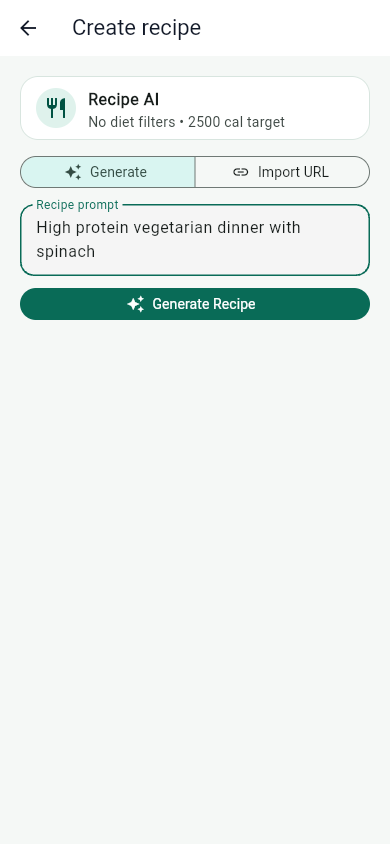
Can a recipe app import a recipe from a URL and turn it into a meal plan? Yes—with an important distinction. MyFitLife can take a publicly accessible recipe page, transform its readable content into a reviewable recipe, and make that recipe available for logging, saving, planning, or shopping. It does not claim that one link automatically creates a complete, verified weekly menu. It creates a plan-ready recipe while keeping the consequential actions under the user’s control.
In the app, the path is Recipe AI > Import URL > Import Recipe. When processing succeeds, MyFitLife presents a recipe card before anything is logged or added to a plan. That separation matters because web recipes are inconsistent documents, nutrition values are estimates, and an AI-normalized result should be reviewed before you save, log, plan, or shop from it.
What does a recipe importer have to translate?
A recipe page is not a universal recipe file. It is an HTTP document built for people, browsers, search engines, advertisements, and site navigation. The useful recipe may appear as visible headings and lists, embedded metadata, or both. Schema.org defines Recipe properties such as recipeIngredient, recipeInstructions, recipeYield, prepTime, cookTime, nutrition, and suitableForDiet. Google documents a related structured-data format that publishers can use to make recipes eligible for richer search presentation.
- The visible page may describe ingredients and instructions in ordinary HTML.
- A JSON-LD block may express Recipe fields as JSON-based linked data.
- Ingredient quantities may be free-form text rather than normalized numbers and units.
- Yield may mean servings, people, pieces, loaves, bowls, or another publisher-defined result.
- Nutrition may be absent, incomplete, rounded, or calculated for a serving definition that is difficult to identify.
JSON-LD improves machine readability, but it is not a certificate of correctness. The W3C specification describes how linked data is represented; it does not verify that a publisher measured the ingredients, yield, or nutrition accurately. Markup can also be missing, malformed, stale, or different from the visible recipe. MyFitLife therefore does not promise a JSON-LD-only import contract or accept structured fields as unquestionable facts. The current workflow normalizes the fetched page content into MyFitLife’s recipe shape and then exposes the result for review.
How can an app fetch a public recipe URL safely?
URL import requires the backend to make a network request chosen by a user. That is useful, but it also creates a server-side request forgery risk: without controls, a crafted URL could attempt to reach an internal service, loop through redirects, or retrieve an unexpectedly large response. OWASP recommends treating user-supplied destinations as untrusted and validating the destination before allowing the application server to connect.
- MyFitLife accepts web URLs using HTTP or HTTPS and rejects URLs without a valid host.
- Embedded URL credentials are rejected instead of being forwarded to another server.
- The hostname is resolved and the resolved addresses must be publicly routable.
- The connection uses an approved resolved address while retaining the original host for HTTP and TLS identity checks.
- Response size, connection time, total processing time, and redirect depth are bounded.
- Every redirect destination is resolved and validated again before the next request is made.
Redirect validation is essential. RFC 9110 explains that a 3xx response can point to another URI, so a public address can redirect somewhere entirely different. Rechecking every hop keeps the first URL from becoming a security pass. MyFitLife rejects private network locations and arbitrary files. It does not sign in or bypass paywalls, so pages requiring an account, subscription, or browser session may not import.
How does AI normalization become a reviewable recipe?
After the page is fetched, MyFitLife converts the useful source text into a consistent recipe response. The normalization step organizes a title, ingredients, instructions, serving context, calories and supported macros, confidence information, warnings, and source metadata into fields the mobile app can display. This is different from copying a web page wholesale. It is a transformation from publisher-specific prose into a structured draft that can participate in MyFitLife workflows.
Generative AI is useful when the source says “one bunch,” “season to taste,” or “divide the sauce,” but that flexibility is also why review is necessary. NIST’s AI Risk Management Framework and Generative AI Profile emphasize managing validity, reliability, transparency, and human oversight across an AI system’s lifecycle. In this use case, the practical control is visible: the imported result is shown as a recipe card instead of being silently committed as consumed food.
- Confirm that the imported title matches the intended recipe rather than a related story or recommendation on the page.
- Compare the displayed serving context with the source recipe’s yield.
- Check that ingredient names, quantities, and units were not dropped or combined incorrectly.
- Review the instruction order, especially divided ingredients, marinades, resting periods, and optional garnishes.
- Treat displayed calories, protein, carbohydrates, and fat as estimates that need verification before health decisions.
- Read any warning or confidence information and abandon the result if the source could not be interpreted reliably.
Why are recipe imports asynchronous and idempotent?
Importing is slower and less predictable than opening a saved local record. The remote site must respond, its content must be processed, and the normalization service must finish. Holding one fragile mobile request open through every stage would make a weak connection look like a failed import even when the backend had already started working. MyFitLife instead submits an authenticated, owner-scoped recipe job and checks that job for progress.
The submission also carries an idempotency key. For the same operation and payload, that key maps back to the same job rather than authorizing repeated AI work. Reusing the key with different input is rejected. The app retains an opaque, expiring recovery receipt—not the recipe URL or prompt in plaintext recovery preferences—so it can look up an accepted request after an interruption.
- Check progress asks for the known job instead of submitting another import.
- Check original request resolves an ambiguous submission through its idempotency receipt.
- Retry same request preserves the existing operation identity when delivery was uncertain.
- Abandon request explicitly clears the unresolved client workflow before a different request can begin.
- The recipe text can become reviewable before a separately queued optional image finishes.
Idempotency does not mean every upstream website or AI response is deterministic. It means a retry is tied to the original MyFitLife operation, reducing duplicate jobs and duplicate quota use when the phone cannot tell whether its first submission was accepted. The source page may still change between genuinely separate imports, and a new import can produce a different normalized draft.
Why is serving size the hardest field to get right?
A recipe yield and a nutrition serving are related but not automatically identical. A page might say a soup serves six while publishing nutrition for one cup, or say a tray makes twelve pieces without stating how many pieces form one serving. The FDA explains that Nutrition Facts values are usually based on one labeled serving and that serving size describes an amount customarily consumed, not a recommendation for how much someone should eat.
That distinction affects every downstream calculation. If a recipe’s base nutrition represents one serving, selecting two servings should scale calories and available macros by two. Ingredients with parseable quantities can also be scaled. Free-form instructions such as “salt to taste,” however, do not become exact merely because the numeric ingredients doubled.
- Verify whether the source nutrition is per serving, per recipe, or based on another portion.
- Check unit-sensitive ingredients such as ounces, fluid ounces, cups, grams, cans, and pieces.
- Review scaled ingredients before shopping because text such as “one 14-ounce can” may carry packaging context.
- Do not treat a serving selector as evidence that the imported base values were correct.
Once an imported recipe is saved, Cookbook recipe cards and detail views provide serving-aware actions. The selected serving amount updates visible calories and macros and scales ingredient quantities that can be parsed. Logging stores the base recipe with the selected quantity, while shopping receives scaled ingredient strings. The selection is an action-level choice rather than a permanent claim about how much the user always eats.
Why are Save, Log, Plan, and Shopping separate actions?
A trustworthy recipe workflow distinguishes a reusable idea from an event that actually happened. Importing proves only that a draft was created. It does not prove the meal was cooked, eaten, scheduled, or purchased. MyFitLife keeps those state changes separate on the review card.
- Log Dinner records the one-serving imported draft in Dinner. Use it only when that default represents what should be added to the day’s food log.
- Save stores the reviewed recipe in Cookbook, where it can be reopened and edited without claiming that it was eaten.
- Save & Plan first creates the canonical Cookbook recipe and then opens the planning path. After saving, the button becomes Plan.
- Shopping adds the current recipe ingredient strings to the MyFitLife shopping list. It does not order groceries, check household inventory, or confirm store availability.
Keeping those actions distinct also prevents identity problems. A planned recipe should refer to the saved Cookbook record rather than a temporary AI response. Saving before planning gives the recipe a reusable identity for later edits, logging, serving changes, and grocery actions. Planning still means placing the recipe into the user’s plan; it does not automatically design an entire nutritionally optimized week around one imported URL.
What can prevent a recipe URL from importing correctly?
- The page requires a sign-in, paid subscription, consent flow, or browser session that the importer does not have.
- The site blocks automated requests or builds essential recipe content only after client-side interaction.
- The address redirects too many times, resolves to a disallowed destination, times out, or returns an unsuitable response.
- The visible page mixes several recipes, substitutions, advertisements, or long narrative sections that make the intended recipe ambiguous.
- The source omits yield, nutrition, units, or complete instructions, leaving the normalizer without enough evidence.
- An ingredient phrase cannot be converted into a reliable scalable quantity.
These are normal limits of URL-based extraction, not reasons to invent missing facts. If the review card does not faithfully represent the source, do not log it. Try a clearer public recipe page, edit the saved Cookbook recipe using information you can verify, or create the recipe manually. Import is a convenience layer over a heterogeneous web, not a guarantee that every URL can become a usable recipe.
How accurate is imported recipe nutrition?
Imported nutrition should be treated as an estimate. USDA FoodData Central documents multiple data types with different sources, update schedules, descriptions, portions, and analytical foundations. A branded food value may originate with manufacturer label data, while a Foundation Food can include analytically derived values. Even a reputable database match is not enough unless the ingredient, preparation state, portion, and edible amount match the recipe.
AI normalization can organize source information, but it cannot weigh the finished dish, observe ingredient substitutions, measure cooking loss, or prove the portion served. MyFitLife does not guarantee exact nutrition for an imported recipe. The National Cancer Institute’s dietary-assessment guidance also identifies reporting and measurement error as persistent limits of food records. Precision on a screen should therefore be read as calculation precision, not proof of biological intake.
- Compare packaged ingredients with their current labels when precision matters.
- Check raw-versus-cooked descriptions and drained-versus-undrained weights.
- Account for oils, sauces, toppings, and optional ingredients that may be consumed but omitted.
- Verify allergens, dietary restrictions, food-safety instructions, and medically important details independently.
What are the privacy and responsible-use boundaries?
A recipe URL, recipe draft, AI request, and related usage metadata may be processed to provide and secure the feature. MyFitLife’s Privacy Statement identifies the service providers and data categories involved in AI and recipe features. Import only pages you are comfortable submitting, avoid placing private tokens or credentials in a URL, and respect the source site’s access conditions. URL import is not a mechanism for bypassing a login or paywall.
MyFitLife is a general-wellness tool, not a medical device. The Health Disclaimer states that generated recipes and nutrition estimates may be incomplete, outdated, or inaccurate and advises users to verify labels, serving sizes, ingredients, allergens, warnings, and nutrition details. People making decisions about allergies, diabetes, kidney disease, eating disorders, pregnancy, medication, or another medical concern should use individualized professional guidance rather than relying on an imported recipe calculation.
The MyFitLife answer
MyFitLife answers “Can a recipe app import a recipe from a URL and turn it into a meal plan?” by creating a controlled path from public page to plan-ready recipe. Import URL fetches a public HTTP or HTTPS page through bounded, redirect-aware network controls. An authenticated, idempotent background job turns the available source content into a structured draft. The app then shows the title, ingredients, instructions, serving context, nutrition estimates, confidence, and warnings for review before a food-log or planning action occurs.
From that review card, Save, Log, Plan, and Shopping remain separate choices. Saved recipes are editable in Cookbook, and serving-aware actions can scale displayed macros and parseable ingredients. MyFitLife does not promise support for every URL, exact nutrition, pantry-aware inventory, grocery ordering, or an automatically optimized week. Its answer is more useful and more defensible: import the recipe, inspect the transformation, then decide exactly what should happen next.
Sources and further reading
- Recipe Schema.org
- Recipe Structured Data Google Search Central
- JSON-LD 1.1 World Wide Web Consortium
- Server-Side Request Forgery Prevention Cheat Sheet OWASP
- RFC 9110: HTTP Semantics Internet Engineering Task Force
- FoodData Central U.S. Department of Agriculture
- FoodData Central API Guide U.S. Department of Agriculture
- FoodData Central Data Type Documentation U.S. Department of Agriculture
- Serving Size on the Nutrition Facts Label U.S. Food and Drug Administration
- AI Risk Management Framework National Institute of Standards and Technology
- Artificial Intelligence Risk Management Framework: Generative Artificial Intelligence Profile National Institute of Standards and Technology
- Dietary Assessment Primer: Food Record Validation National Cancer Institute
- MyFitLife Privacy Statement MyFitLife
- MyFitLife Health Disclaimer MyFitLife
Related articles
- Can a Grocery List Automatically Sort Recipe Ingredients by Store Aisle?
- Meal Planning With a Grocery List: A Simple Weekly System
- How to Build a Healthy Grocery List for Weight Loss
Install free. Keep the core tracker free.
Log food, scan barcodes, track macros, and review progress without starting a subscription.